📄 expo/versions/latest/sdk/filesystem-legacy
File: filesystem-legacy.md | Updated: 11/15/2025
Source: https://docs.expo.dev/versions/latest/sdk/filesystem-legacy
Hide navigation
Search
Ctrl K
Home Guides EAS Reference Learn
Reference version
SDK 54 (latest)
Archive Expo Snack Discord and Forums Newsletter
 Expo FileSystem (legacy)
Ask AI
A library that provides access to the local file system on the device.
Ask AI
Android
iOS
tvOS
Bundled version:
~19.0.17
Copy page
The
legacyversion of the FileSystem API is included in theexpo-file-systemlibrary. It can be used alongside the modern API for backward compatibility reasons.
expo-file-system provides access to a file system stored locally on the device. It is also capable of uploading and downloading files from network URLs.
Diagram explaining how expo-file-system interacts with different resources
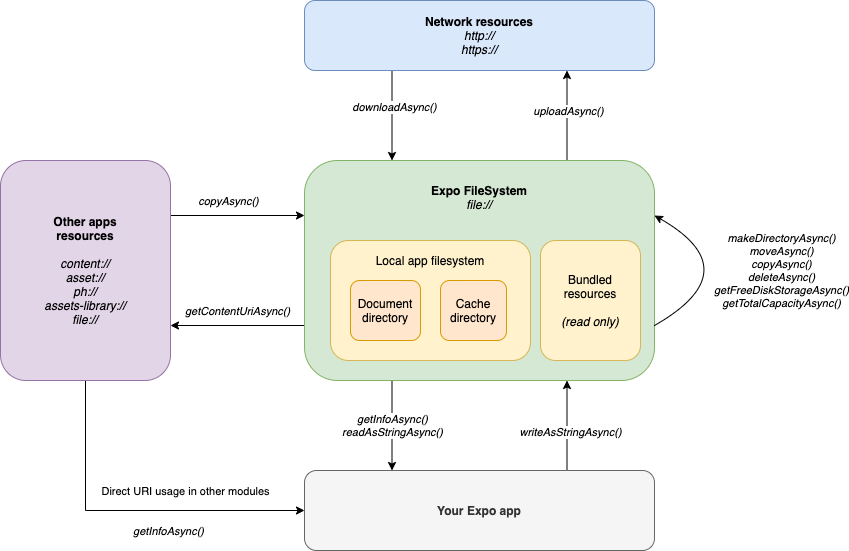
How expo-file-system works differently inside of the Expo Go app
Within Expo Go, each project has a separate file system scope and has no access to the file system of other projects.
Terminal
Copy
- npx expo install expo-file-system
If you are installing this in an existing React Native app
, make sure to install expo
in your project.
Downloading files
Component.js
Copy
const callback = downloadProgress => { const progress = downloadProgress.totalBytesWritten / downloadProgress.totalBytesExpectedToWrite; this.setState({ downloadProgress: progress, }); }; const downloadResumable = FileSystem.createDownloadResumable( 'http://techslides.com/demos/sample-videos/small.mp4', FileSystem.documentDirectory + 'small.mp4', {}, callback ); try { const { uri } = await downloadResumable.downloadAsync(); console.log('Finished downloading to ', uri); } catch (e) { console.error(e); } try { await downloadResumable.pauseAsync(); console.log('Paused download operation, saving for future retrieval'); AsyncStorage.setItem('pausedDownload', JSON.stringify(downloadResumable.savable())); } catch (e) { console.error(e); } try { const { uri } = await downloadResumable.resumeAsync(); console.log('Finished downloading to ', uri); } catch (e) { console.error(e); } //To resume a download across app restarts, assuming the DownloadResumable.savable() object was stored: const downloadSnapshotJson = await AsyncStorage.getItem('pausedDownload'); const downloadSnapshot = JSON.parse(downloadSnapshotJson); const downloadResumable = new FileSystem.DownloadResumable( downloadSnapshot.url, downloadSnapshot.fileUri, downloadSnapshot.options, callback, downloadSnapshot.resumeData ); try { const { uri } = await downloadResumable.resumeAsync(); console.log('Finished downloading to ', uri); } catch (e) { console.error(e); }
Show More
Managing Giphy's
Giphy example
Copy
Open in Snack
import * as FileSystem from 'expo-file-system/legacy'; const gifDir = FileSystem.cacheDirectory + 'giphy/'; const gifFileUri = (gifId: string) => gifDir + `gif_${gifId}_200.gif`; const gifUrl = (gifId: string) => `https://media1.giphy.com/media/${gifId}/200.gif`; // Checks if gif directory exists. If not, creates it async function ensureDirExists() { const dirInfo = await FileSystem.getInfoAsync(gifDir); if (!dirInfo.exists) { console.log("Gif directory doesn't exist, creating…"); await FileSystem.makeDirectoryAsync(gifDir, { intermediates: true }); } } // Downloads all gifs specified as array of IDs export async function addMultipleGifs(gifIds: string[]) { try { await ensureDirExists(); console.log('Downloading', gifIds.length, 'gif files…'); await Promise.all(gifIds.map(id => FileSystem.downloadAsync(gifUrl(id), gifFileUri(id)))); } catch (e) { console.error("Couldn't download gif files:", e); } } // Returns URI to our local gif file // If our gif doesn't exist locally, it downloads it export async function getSingleGif(gifId: string) { await ensureDirExists(); const fileUri = gifFileUri(gifId); const fileInfo = await FileSystem.getInfoAsync(fileUri); if (!fileInfo.exists) { console.log("Gif isn't cached locally. Downloading…"); await FileSystem.downloadAsync(gifUrl(gifId), fileUri); } return fileUri; } // Exports shareable URI - it can be shared outside your app export async function getGifContentUri(gifId: string) { return FileSystem.getContentUriAsync(await getSingleGif(gifId)); } // Deletes whole giphy directory with all its content export async function deleteAllGifs() { console.log('Deleting all GIF files…'); await FileSystem.deleteAsync(gifDir); }
Show More
Server: handling multipart requests
The simple server in Node.js, which can save uploaded images to disk:
index.js
Copy
const express = require('express'); const app = express(); const fs = require('fs'); const multer = require('multer'); const upload = multer({ dest: 'uploads/' }); // This method will save the binary content of the request as a file. app.patch('/binary-upload', (req, res) => { req.pipe(fs.createWriteStream('./uploads/image' + Date.now() + '.png')); res.end('OK'); }); // This method will save a "photo" field from the request as a file. app.patch('/multipart-upload', upload.single('photo'), (req, res) => { // You can access other HTTP parameters. They are located in the body object. console.log(req.body); res.end('OK'); }); app.listen(3000, () => { console.log('Working on port 3000'); });
Show More
import * as FileSystem from 'expo-file-system/legacy';
Directories
The API takes file:// URIs pointing to local files on the device to identify files. Each app only has read and write access to locations under the following directories:
So, for example, the URI to a file named 'myFile' under 'myDirectory' in the app's user documents directory would be FileSystem.documentDirectory + 'myDirectory/myFile'.
Expo APIs that create files generally operate within these directories. This includes Audio recordings, Camera photos, ImagePicker results, SQLite databases and takeSnapShotAsync() results. This allows their use with the FileSystem API.
Some FileSystem functions are able to read from (but not write to) other locations.
SAF URI
A SAF URI is a URI that is compatible with the Storage Access Framework. It should look like this content://com.android.externalstorage.*. The easiest way to obtain such URI is by requestDirectoryPermissionsAsync
method.
FileSystem Legacy.bundleDirectory
Android
iOS
tvOS
Type: null | string
URI to the directory where assets bundled with the application are stored.
FileSystem Legacy.cacheDirectory
Android
iOS
tvOS
Type: null | string
file:// URI pointing to the directory where temporary files used by this app will be stored. Files stored here may be automatically deleted by the system when low on storage. Example uses are for downloaded or generated files that the app just needs for one-time usage.
FileSystem Legacy.documentDirectory
Android
iOS
tvOS
Type: null | string
file:// URI pointing to the directory where user documents for this app will be stored. Files stored here will remain until explicitly deleted by the app. Ends with a trailing /. Example uses are for files the user saves that they expect to see again.
DownloadResumable
Android
iOS
tvOS
Type: Class extends [FileSystemCancellableNetworkTask](https://docs.expo.dev/versions/latest/sdk/filesystem-legacy#filesystemcancellablenetworktask) <[DownloadProgressData](https://docs.expo.dev/versions/latest/sdk/filesystem-legacy#downloadprogressdata) >
DownloadResumable Properties
fileUri
Android
iOS
tvOS
Type: string
DownloadResumable Methods
cancelAsync()
Android
iOS
tvOS
Returns:
[Promise](https://developer.mozilla.org/en-US/docs/Web/JavaScript/Reference/Global_Objects/Promise) <void>
downloadAsync()
Android
iOS
tvOS
Download the contents at a remote URI to a file in the app's file system.
Returns:
[Promise](https://developer.mozilla.org/en-US/docs/Web/JavaScript/Reference/Global_Objects/Promise) <undefined | [FileSystemDownloadResult](https://docs.expo.dev/versions/latest/sdk/filesystem-legacy#filesystemdownloadresult) >
Returns a Promise that resolves to FileSystemDownloadResult object, or to undefined when task was cancelled.
pauseAsync()
Android
iOS
tvOS
Pause the current download operation. resumeData is added to the DownloadResumable object after a successful pause operation. Returns an object that can be saved with AsyncStorage for future retrieval (the same object that is returned from calling FileSystem.DownloadResumable.savable()).
Returns:
[Promise](https://developer.mozilla.org/en-US/docs/Web/JavaScript/Reference/Global_Objects/Promise) <[DownloadPauseState](https://docs.expo.dev/versions/latest/sdk/filesystem-legacy#downloadpausestate) >
Returns a Promise that resolves to DownloadPauseState object.
resumeAsync()
Android
iOS
tvOS
Resume a paused download operation.
Returns:
[Promise](https://developer.mozilla.org/en-US/docs/Web/JavaScript/Reference/Global_Objects/Promise) <undefined | [FileSystemDownloadResult](https://docs.expo.dev/versions/latest/sdk/filesystem-legacy#filesystemdownloadresult) >
Returns a Promise that resolves to FileSystemDownloadResult object, or to undefined when task was cancelled.
savable()
Android
iOS
tvOS
Method to get the object which can be saved with AsyncStorage for future retrieval.
Returns:
[DownloadPauseState](https://docs.expo.dev/versions/latest/sdk/filesystem-legacy#downloadpausestate)
Returns object in shape of DownloadPauseState type.
FileSystemCancellableNetworkTask
Android
iOS
tvOS
FileSystemCancellableNetworkTask Methods
cancelAsync()
Android
iOS
tvOS
Returns:
[Promise](https://developer.mozilla.org/en-US/docs/Web/JavaScript/Reference/Global_Objects/Promise) <void>
UploadTask
Android
iOS
tvOS
Type: Class extends [FileSystemCancellableNetworkTask](https://docs.expo.dev/versions/latest/sdk/filesystem-legacy#filesystemcancellablenetworktask) <[UploadProgressData](https://docs.expo.dev/versions/latest/sdk/filesystem-legacy#uploadprogressdata) >
UploadTask Methods
cancelAsync()
Android
iOS
tvOS
Returns:
[Promise](https://developer.mozilla.org/en-US/docs/Web/JavaScript/Reference/Global_Objects/Promise) <void>
uploadAsync()
Android
iOS
tvOS
Returns:
[Promise](https://developer.mozilla.org/en-US/docs/Web/JavaScript/Reference/Global_Objects/Promise) <undefined | null | [FileSystemUploadResult](https://docs.expo.dev/versions/latest/sdk/filesystem-legacy#filesystemuploadresult) >
FileSystem Legacy.copyAsync(options)
Android
iOS
tvOS
| Parameter | Type | Description |
| --- | --- | --- |
| options | [RelocatingOptions](https://docs.expo.dev/versions/latest/sdk/filesystem-legacy#relocatingoptions) | A map of move options represented by RelocatingOptions<br> type. |
Create a copy of a file or directory. Directories are recursively copied with all of their contents. It can be also used to copy content shared by other apps to local filesystem.
Returns:
[Promise](https://developer.mozilla.org/en-US/docs/Web/JavaScript/Reference/Global_Objects/Promise) <void>
FileSystem Legacy.createDownloadResumable(uri, fileUri, options, callback, resumeData)
Android
iOS
tvOS
| Parameter | Type | Description |
| --- | --- | --- |
| uri | string | The remote URI to download from. |
| fileUri | string | The local URI of the file to download to. If there is no file at this URI, a new one is created. If there is a file at this URI, its contents are replaced. The directory for the file must exist. |
| options(optional) | [DownloadOptions](https://docs.expo.dev/versions/latest/sdk/filesystem-legacy#downloadoptions) | A map of download options represented by DownloadOptions<br> type. |
| callback(optional) | [FileSystemNetworkTaskProgressCallback](https://docs.expo.dev/versions/latest/sdk/filesystem-legacy#filesystemnetworktaskprogresscallback) <[DownloadProgressData](https://docs.expo.dev/versions/latest/sdk/filesystem-legacy#downloadprogressdata) > | This function is called on each data write to update the download progress.<br><br>> Note: When the app has been moved to the background, this callback won't be fired until it's moved to the foreground. |
| resumeData(optional) | string | The string which allows the api to resume a paused download. This is set on the DownloadResumable object automatically when a download is paused. When initializing a new DownloadResumable this should be null. |
Create a DownloadResumable object which can start, pause, and resume a download of contents at a remote URI to a file in the app's file system.
Note: You need to call
downloadAsync(), on aDownloadResumableinstance to initiate the download. TheDownloadResumableobject has a callback that provides download progress updates. Downloads can be resumed across app restarts by usingAsyncStorageto store theDownloadResumable.savable()object for later retrieval. Thesavableobject contains the arguments required to initialize a newDownloadResumableobject to resume the download after an app restart. The directory for a local file uri must exist prior to calling this function.
Returns:
[DownloadResumable](https://docs.expo.dev/versions/latest/sdk/filesystem-legacy#downloadresumable)
FileSystem Legacy.createUploadTask(url, fileUri, options, callback)
Android
iOS
tvOS
| Parameter | Type |
| --- | --- |
| url | string |
| fileUri | string |
| options(optional) | [FileSystemUploadOptions](https://docs.expo.dev/versions/latest/sdk/filesystem-legacy#filesystemuploadoptions) |
| callback(optional) | [FileSystemNetworkTaskProgressCallback](https://docs.expo.dev/versions/latest/sdk/filesystem-legacy#filesystemnetworktaskprogresscallback) <[UploadProgressData](https://docs.expo.dev/versions/latest/sdk/filesystem-legacy#uploadprogressdata) > |
Returns:
[UploadTask](https://docs.expo.dev/versions/latest/sdk/filesystem-legacy#uploadtask)
FileSystem Legacy.deleteAsync(fileUri, options)
Android
iOS
tvOS
| Parameter | Type | Description |
| --- | --- | --- |
| fileUri | string | file:// or SAF<br> URI to the file or directory. |
| options(optional) | [DeletingOptions](https://docs.expo.dev/versions/latest/sdk/filesystem-legacy#deletingoptions) | A map of write options represented by DeletingOptions<br> type.<br><br>Default:{} |
Delete a file or directory. If the URI points to a directory, the directory and all its contents are recursively deleted.
Returns:
[Promise](https://developer.mozilla.org/en-US/docs/Web/JavaScript/Reference/Global_Objects/Promise) <void>
FileSystem Legacy.deleteLegacyDocumentDirectoryAndroid()
Android
iOS
tvOS
Returns:
[Promise](https://developer.mozilla.org/en-US/docs/Web/JavaScript/Reference/Global_Objects/Promise) <void>
FileSystem Legacy.downloadAsync(uri, fileUri, options)
Android
iOS
tvOS
| Parameter | Type | Description |
| --- | --- | --- |
| uri | string | The remote URI to download from. |
| fileUri | string | The local URI of the file to download to. If there is no file at this URI, a new one is created. If there is a file at this URI, its contents are replaced. The directory for the file must exist. |
| options(optional) | [DownloadOptions](https://docs.expo.dev/versions/latest/sdk/filesystem-legacy#downloadoptions) | A map of download options represented by DownloadOptions<br> type.<br><br>Default:{} |
Download the contents at a remote URI to a file in the app's file system. The directory for a local file uri must exist prior to calling this function.
Returns:
[Promise](https://developer.mozilla.org/en-US/docs/Web/JavaScript/Reference/Global_Objects/Promise) <[FileSystemDownloadResult](https://docs.expo.dev/versions/latest/sdk/filesystem-legacy#filesystemdownloadresult) >
Returns a Promise that resolves to a FileSystemDownloadResult object.
Example
FileSystem.downloadAsync( 'http://techslides.com/demos/sample-videos/small.mp4', FileSystem.documentDirectory + 'small.mp4' ) .then(({ uri }) => { console.log('Finished downloading to ', uri); }) .catch(error => { console.error(error); });
FileSystem Legacy.getContentUriAsync(fileUri)
Android
| Parameter | Type | Description |
| --- | --- | --- |
| fileUri | string | The local URI of the file. If there is no file at this URI, an exception will be thrown. |
Takes a file:// URI and converts it into content URI (content://) so that it can be accessed by other applications outside of Expo.
Returns:
[Promise](https://developer.mozilla.org/en-US/docs/Web/JavaScript/Reference/Global_Objects/Promise) <string>
Returns a Promise that resolves to a string containing a content:// URI pointing to the file. The URI is the same as the fileUri input parameter but in a different format.
Example
FileSystem.getContentUriAsync(uri).then(cUri => { console.log(cUri); IntentLauncher.startActivityAsync('android.intent.action.VIEW', { data: cUri, flags: 1, }); });
FileSystem Legacy.getFreeDiskStorageAsync()
Android
iOS
tvOS
Gets the available internal disk storage size, in bytes. This returns the free space on the data partition that hosts all of the internal storage for all apps on the device.
Returns:
[Promise](https://developer.mozilla.org/en-US/docs/Web/JavaScript/Reference/Global_Objects/Promise) <number>
Returns a Promise that resolves to the number of bytes available on the internal disk.
FileSystem Legacy.getInfoAsync(fileUri, options)
Android
iOS
tvOS
| Parameter | Type | Description |
| --- | --- | --- |
| fileUri | string | URI to the file or directory. See supported URI schemes<br>. |
| options(optional) | [InfoOptions](https://docs.expo.dev/versions/latest/sdk/filesystem-legacy#infooptions) | A map of options represented by InfoOptions<br> type.<br><br>Default:{} |
Get metadata information about a file, directory or external content/asset.
Returns:
[Promise](https://developer.mozilla.org/en-US/docs/Web/JavaScript/Reference/Global_Objects/Promise) <[FileInfo](https://docs.expo.dev/versions/latest/sdk/filesystem-legacy#fileinfo) >
A Promise that resolves to a FileInfo object. If no item exists at this URI, the returned Promise resolves to FileInfo object in form of { exists: false, isDirectory: false }.
FileSystem Legacy.getTotalDiskCapacityAsync()
Android
iOS
tvOS
Gets total internal disk storage size, in bytes. This is the total capacity of the data partition that hosts all the internal storage for all apps on the device.
Returns:
[Promise](https://developer.mozilla.org/en-US/docs/Web/JavaScript/Reference/Global_Objects/Promise) <number>
Returns a Promise that resolves to a number that specifies the total internal disk storage capacity in bytes.
FileSystem Legacy.makeDirectoryAsync(fileUri, options)
Android
iOS
tvOS
| Parameter | Type | Description |
| --- | --- | --- |
| fileUri | string | file:// URI to the new directory to create. |
| options(optional) | [MakeDirectoryOptions](https://docs.expo.dev/versions/latest/sdk/filesystem-legacy#makedirectoryoptions) | A map of create directory options represented by MakeDirectoryOptions<br> type.<br><br>Default:{} |
Create a new empty directory.
Returns:
[Promise](https://developer.mozilla.org/en-US/docs/Web/JavaScript/Reference/Global_Objects/Promise) <void>
FileSystem Legacy.moveAsync(options)
Android
iOS
tvOS
| Parameter | Type | Description |
| --- | --- | --- |
| options | [RelocatingOptions](https://docs.expo.dev/versions/latest/sdk/filesystem-legacy#relocatingoptions) | A map of move options represented by RelocatingOptions<br> type. |
Move a file or directory to a new location.
Returns:
[Promise](https://developer.mozilla.org/en-US/docs/Web/JavaScript/Reference/Global_Objects/Promise) <void>
FileSystem Legacy.readAsStringAsync(fileUri, options)
Android
iOS
tvOS
| Parameter | Type | Description |
| --- | --- | --- |
| fileUri | string | file:// or SAF<br> URI to the file or directory. |
| options(optional) | [ReadingOptions](https://docs.expo.dev/versions/latest/sdk/filesystem-legacy#readingoptions) | A map of read options represented by ReadingOptions<br> type.<br><br>Default:{} |
Read the entire contents of a file as a string. Binary will be returned in raw format, you will need to append data:image/png;base64, to use it as Base64.
Returns:
[Promise](https://developer.mozilla.org/en-US/docs/Web/JavaScript/Reference/Global_Objects/Promise) <string>
A Promise that resolves to a string containing the entire contents of the file.
FileSystem Legacy.readDirectoryAsync(fileUri)
Android
iOS
tvOS
| Parameter | Type | Description |
| --- | --- | --- |
| fileUri | string | file:// URI to the directory. |
Enumerate the contents of a directory.
Returns:
[Promise](https://developer.mozilla.org/en-US/docs/Web/JavaScript/Reference/Global_Objects/Promise) <string[]>
A Promise that resolves to an array of strings, each containing the name of a file or directory contained in the directory at fileUri.
FileSystem Legacy.uploadAsync(url, fileUri, options)
Android
iOS
tvOS
| Parameter | Type | Description |
| --- | --- | --- |
| url | string | The remote URL, where the file will be sent. |
| fileUri | string | The local URI of the file to send. The file must exist. |
| options(optional) | [FileSystemUploadOptions](https://docs.expo.dev/versions/latest/sdk/filesystem-legacy#filesystemuploadoptions) | A map of download options represented by FileSystemUploadOptions<br> type.<br><br>Default:{} |
Upload the contents of the file pointed by fileUri to the remote url.
Returns:
[Promise](https://developer.mozilla.org/en-US/docs/Web/JavaScript/Reference/Global_Objects/Promise) <[FileSystemUploadResult](https://docs.expo.dev/versions/latest/sdk/filesystem-legacy#filesystemuploadresult) >
Returns a Promise that resolves to FileSystemUploadResult object.
Example
Client
import * as FileSystem from 'expo-file-system/legacy'; try { const response = await FileSystem.uploadAsync(`http://192.168.0.1:1234/binary-upload`, fileUri, { fieldName: 'file', httpMethod: 'PATCH', uploadType: FileSystem.FileSystemUploadType.BINARY_CONTENT, }); console.log(JSON.stringify(response, null, 4)); } catch (error) { console.log(error); }
Server
Refer to the "Server: Handling multipart requests " example - there is code for a simple Node.js server.
FileSystem Legacy.writeAsStringAsync(fileUri, contents, options)
Android
iOS
tvOS
| Parameter | Type | Description |
| --- | --- | --- |
| fileUri | string | file:// or SAF<br> URI to the file or directory.<br><br>> Note: when you're using SAF URI the file needs to exist. You can't create a new file. |
| contents | string | The string to replace the contents of the file with. |
| options(optional) | [WritingOptions](https://docs.expo.dev/versions/latest/sdk/filesystem-legacy#writingoptions) | A map of write options represented by WritingOptions<br> type.<br><br>Default:{} |
Write the entire contents of a file as a string.
Returns:
[Promise](https://developer.mozilla.org/en-US/docs/Web/JavaScript/Reference/Global_Objects/Promise) <void>
StorageAccessFramework
Android
The StorageAccessFramework is a namespace inside of the expo-file-system module, which encapsulates all functions which can be used with SAF URIs
. You can read more about SAF in the Android documentation
.
Example
Basic Usage
import { StorageAccessFramework } from 'expo-file-system'; // Requests permissions for external directory const permissions = await StorageAccessFramework.requestDirectoryPermissionsAsync(); if (permissions.granted) { // Gets SAF URI from response const uri = permissions.directoryUri; // Gets all files inside of selected directory const files = await StorageAccessFramework.readDirectoryAsync(uri); alert(`Files inside ${uri}:\n\n${JSON.stringify(files)}`); }
Migrating an album
import * as MediaLibrary from 'expo-media-library'; import * as FileSystem from 'expo-file-system/legacy'; const { StorageAccessFramework } = FileSystem; async function migrateAlbum(albumName: string) { // Gets SAF URI to the album const albumUri = StorageAccessFramework.getUriForDirectoryInRoot(albumName); // Requests permissions const permissions = await StorageAccessFramework.requestDirectoryPermissionsAsync(albumUri); if (!permissions.granted) { return; } const permittedUri = permissions.directoryUri; // Checks if users selected the correct folder if (!permittedUri.includes(albumName)) { return; } const mediaLibraryPermissions = await MediaLibrary.requestPermissionsAsync(); if (!mediaLibraryPermissions.granted) { return; } // Moves files from external storage to internal storage await StorageAccessFramework.moveAsync({ from: permittedUri, to: FileSystem.documentDirectory!, }); const outputDir = FileSystem.documentDirectory! + albumName; const migratedFiles = await FileSystem.readDirectoryAsync(outputDir); // Creates assets from local files const [newAlbumCreator, ...assets] = await Promise.all( migratedFiles.map<Promise<MediaLibrary.Asset>>( async fileName => await MediaLibrary.createAssetAsync(outputDir + '/' + fileName) ) ); // Album was empty if (!newAlbumCreator) { return; } // Creates a new album in the scoped directory const newAlbum = await MediaLibrary.createAlbumAsync(albumName, newAlbumCreator, false); if (assets.length) { await MediaLibrary.addAssetsToAlbumAsync(assets, newAlbum, false); } }
Show More
StorageAccessFramework Methods
copyAsync(options)
Android
| Parameter | Type | Description |
| --- | --- | --- |
| options | [RelocatingOptions](https://docs.expo.dev/versions/latest/sdk/filesystem-legacy#relocatingoptions) | A map of move options represented by RelocatingOptions<br> type. |
Alias for copyAsync
method.
Returns:
[Promise](https://developer.mozilla.org/en-US/docs/Web/JavaScript/Reference/Global_Objects/Promise) <void>
createFileAsync(parentUri, fileName, mimeType)
Android
| Parameter | Type | Description |
| --- | --- | --- |
| parentUri | string | The SAF<br> URI to the parent directory. |
| fileName | string | The name of new file without the extension. |
| mimeType | string | The MIME type of new file. |
Creates a new empty file.
Returns:
[Promise](https://developer.mozilla.org/en-US/docs/Web/JavaScript/Reference/Global_Objects/Promise) <string>
A Promise that resolves to a SAF URI to the created file.
deleteAsync(fileUri, options)
Android
| Parameter | Type | Description |
| --- | --- | --- |
| fileUri | string | file:// or SAF<br> URI to the file or directory. |
| options(optional) | [DeletingOptions](https://docs.expo.dev/versions/latest/sdk/filesystem-legacy#deletingoptions) | A map of write options represented by DeletingOptions<br> type.<br><br>Default:{} |
Alias for deleteAsync
method.
Returns:
[Promise](https://developer.mozilla.org/en-US/docs/Web/JavaScript/Reference/Global_Objects/Promise) <void>
getUriForDirectoryInRoot(folderName)
Android
| Parameter | Type | Description |
| --- | --- | --- |
| folderName | string | The name of the folder which is located in the Android root directory. |
Gets a SAF URI
pointing to a folder in the Android root directory. You can use this function to get URI for StorageAccessFramework.requestDirectoryPermissionsAsync() when you trying to migrate an album. In that case, the name of the album is the folder name.
Returns:
string
Returns a SAF URI to a folder.
makeDirectoryAsync(parentUri, dirName)
Android
| Parameter | Type | Description |
| --- | --- | --- |
| parentUri | string | The SAF<br> URI to the parent directory. |
| dirName | string | The name of new directory. |
Creates a new empty directory.
Returns:
[Promise](https://developer.mozilla.org/en-US/docs/Web/JavaScript/Reference/Global_Objects/Promise) <string>
A Promise that resolves to a SAF URI to the created directory.
moveAsync(options)
Android
| Parameter | Type | Description |
| --- | --- | --- |
| options | [RelocatingOptions](https://docs.expo.dev/versions/latest/sdk/filesystem-legacy#relocatingoptions) | A map of move options represented by RelocatingOptions<br> type. |
Alias for moveAsync
method.
Returns:
[Promise](https://developer.mozilla.org/en-US/docs/Web/JavaScript/Reference/Global_Objects/Promise) <void>
readAsStringAsync(fileUri, options)
Android
| Parameter | Type | Description |
| --- | --- | --- |
| fileUri | string | file:// or SAF<br> URI to the file or directory. |
| options(optional) | [ReadingOptions](https://docs.expo.dev/versions/latest/sdk/filesystem-legacy#readingoptions) | A map of read options represented by ReadingOptions<br> type.<br><br>Default:{} |
Alias for readAsStringAsync
method.
Returns:
[Promise](https://developer.mozilla.org/en-US/docs/Web/JavaScript/Reference/Global_Objects/Promise) <string>
A Promise that resolves to a string containing the entire contents of the file.
readDirectoryAsync(dirUri)
Android
| Parameter | Type | Description |
| --- | --- | --- |
| dirUri | string | SAF<br> URI to the directory. |
Enumerate the contents of a directory.
Returns:
[Promise](https://developer.mozilla.org/en-US/docs/Web/JavaScript/Reference/Global_Objects/Promise) <string[]>
A Promise that resolves to an array of strings, each containing the full SAF URI
of a file or directory contained in the directory at fileUri.
requestDirectoryPermissionsAsync(initialFileUrl)
Android 11+
| Parameter | Type | Description |
| --- | --- | --- |
| initialFileUrl(optional) | null \| string | The SAF URI<br> of the directory that the file picker should display when it first loads. If URI is incorrect or points to a non-existing folder, it's ignored.<br><br>Default:null |
Allows users to select a specific directory, granting your app access to all of the files and sub-directories within that directory.
Returns:
[Promise](https://developer.mozilla.org/en-US/docs/Web/JavaScript/Reference/Global_Objects/Promise) <[FileSystemRequestDirectoryPermissionsResult](https://docs.expo.dev/versions/latest/sdk/filesystem-legacy#filesystemrequestdirectorypermissionsresult) >
Returns a Promise that resolves to FileSystemRequestDirectoryPermissionsResult object.
writeAsStringAsync(fileUri, contents, options)
Android
| Parameter | Type | Description |
| --- | --- | --- |
| fileUri | string | file:// or SAF<br> URI to the file or directory.<br><br>> Note: when you're using SAF URI the file needs to exist. You can't create a new file. |
| contents | string | The string to replace the contents of the file with. |
| options(optional) | [WritingOptions](https://docs.expo.dev/versions/latest/sdk/filesystem-legacy#writingoptions) | A map of write options represented by WritingOptions<br> type.<br><br>Default:{} |
Alias for writeAsStringAsync
method.
Returns:
[Promise](https://developer.mozilla.org/en-US/docs/Web/JavaScript/Reference/Global_Objects/Promise) <void>
DeletingOptions
Android
iOS
tvOS
| Property | Type | Description |
| --- | --- | --- |
| idempotent(optional) | boolean | If true, don't throw an error if there is no file or directory at this URI.<br><br>Default:false |
DownloadOptions
Android
iOS
tvOS
| Property | Type | Description |
| --- | --- | --- |
| cache(optional) | boolean | - |
| headers(optional) | Record<string, string> | An object containing all the HTTP header fields and their values for the download network request. The keys and values of the object are the header names and values respectively. |
| md5(optional) | boolean | If true, include the MD5 hash of the file in the returned object. Provided for convenience since it is common to check the integrity of a file immediately after downloading.<br><br>Default:false |
| sessionType(optional) | [FileSystemSessionType](https://docs.expo.dev/versions/latest/sdk/filesystem-legacy#filesystemsessiontype) | Only for: <br><br>iOS<br><br> <br><br>A session type. Determines if tasks can be handled in the background. On Android, sessions always work in the background and you can't change it.<br><br>Default:FileSystemSessionType.BACKGROUND |
DownloadPauseState
Android
iOS
tvOS
| Property | Type | Description |
| --- | --- | --- |
| fileUri | string | The local URI of the file to download to. If there is no file at this URI, a new one is created. If there is a file at this URI, its contents are replaced. |
| options | [DownloadOptions](https://docs.expo.dev/versions/latest/sdk/filesystem-legacy#downloadoptions) | Object representing the file download options. |
| resumeData(optional) | string | The string which allows the API to resume a paused download. |
| url | string | The remote URI to download from. |
Deprecated use
FileSystemNetworkTaskProgressCallback<DownloadProgressData>instead.
DownloadProgressCallback
Android
iOS
tvOS
Type: [FileSystemNetworkTaskProgressCallback](https://docs.expo.dev/versions/latest/sdk/filesystem-legacy#filesystemnetworktaskprogresscallback) <[DownloadProgressData](https://docs.expo.dev/versions/latest/sdk/filesystem-legacy#downloadprogressdata) >
DownloadProgressData
Android
iOS
tvOS
| Property | Type | Description |
| --- | --- | --- |
| totalBytesExpectedToWrite | number | The total bytes expected to be written by the download operation. A value of -1 means that the server did not return the Content-Length header and the total size is unknown. Without this header, you won't be able to track the download progress. |
| totalBytesWritten | number | The total bytes written by the download operation. |
Deprecated Use
FileSystemDownloadResultinstead.
DownloadResult
Android
iOS
tvOS
Type: [FileSystemDownloadResult](https://docs.expo.dev/versions/latest/sdk/filesystem-legacy#filesystemdownloadresult)
FileInfo
Android
iOS
tvOS
Type: object shaped as below:
| Property | Type | Description |
| --- | --- | --- |
| exists | true | Signifies that the requested file exist. |
| isDirectory | boolean | Boolean set to true if this is a directory and false if it is a file. |
| md5(optional) | string | Present if the md5 option was truthy. Contains the MD5 hash of the file. |
| modificationTime | number | The last modification time of the file expressed in seconds since epoch. |
| size | number | The size of the file in bytes. |
| uri | string | A file:// URI pointing to the file. This is the same as the fileUri input parameter. |
Or object shaped as below:
| Property | Type | Description |
| --- | --- | --- |
| exists | false | - |
| isDirectory | false | - |
| uri | string | - |
FileSystemAcceptedUploadHttpMethod
Android
iOS
tvOS
Literal Type: string
Acceptable values are: 'POST' | 'PUT' | 'PATCH'
FileSystemDownloadResult
Android
iOS
tvOS
Type: [FileSystemHttpResult](https://docs.expo.dev/versions/latest/sdk/filesystem-legacy#filesystemhttpresult) extended by:
| Property | Type | Description |
| --- | --- | --- |
| md5(optional) | string | Present if the md5 option was truthy. Contains the MD5 hash of the file. |
| uri | string | A file:// URI pointing to the file. This is the same as the fileUri input parameter. |
FileSystemHttpResult
Android
iOS
tvOS
| Property | Type | Description |
| --- | --- | --- |
| headers | Record<string, string> | An object containing all the HTTP response header fields and their values for the download network request. The keys and values of the object are the header names and values respectively. |
| mimeType | string \| null | - |
| status | number | The HTTP response status code for the download network request. |
FileSystemNetworkTaskProgressCallback(data)
Android
iOS
tvOS
| Parameter | Type |
| --- | --- |
| data | T |
Returns:
void
FileSystemRequestDirectoryPermissionsResult
Android
iOS
tvOS
Type: object shaped as below:
| Property | Type | Description |
| --- | --- | --- |
| granted | false | - |
Or object shaped as below:
| Property | Type | Description |
| --- | --- | --- |
| directoryUri | string | The SAF URI<br> to the user's selected directory. Available only if permissions were granted. |
| granted | true | - |
FileSystemUploadOptions
Android
iOS
tvOS
Type: [UploadOptionsBinary](https://docs.expo.dev/versions/latest/sdk/filesystem-legacy#uploadoptionsbinary) | [UploadOptionsMultipart](https://docs.expo.dev/versions/latest/sdk/filesystem-legacy#uploadoptionsmultipart) extended by:
| Property | Type | Description |
| --- | --- | --- |
| headers(optional) | Record<string, string> | An object containing all the HTTP header fields and their values for the upload network request. The keys and values of the object are the header names and values respectively. |
| httpMethod(optional) | [FileSystemAcceptedUploadHttpMethod](https://docs.expo.dev/versions/latest/sdk/filesystem-legacy#filesystemaccepteduploadhttpmethod) | The request method.<br><br>Default:FileSystemAcceptedUploadHttpMethod.POST |
| sessionType(optional) | [FileSystemSessionType](https://docs.expo.dev/versions/latest/sdk/filesystem-legacy#filesystemsessiontype) | Only for: <br><br>iOS<br><br> <br><br>A session type. Determines if tasks can be handled in the background. On Android, sessions always work in the background and you can't change it.<br><br>Default:FileSystemSessionType.BACKGROUND |
FileSystemUploadResult
Android
iOS
tvOS
Type: [FileSystemHttpResult](https://docs.expo.dev/versions/latest/sdk/filesystem-legacy#filesystemhttpresult) extended by:
| Property | Type | Description |
| --- | --- | --- |
| body | string | The body of the server response. |
InfoOptions
Android
iOS
tvOS
| Property | Type | Description |
| --- | --- | --- |
| md5(optional) | boolean | Whether to return the MD5 hash of the file.<br><br>Default:false |
MakeDirectoryOptions
Android
iOS
tvOS
| Property | Type | Description |
| --- | --- | --- |
| intermediates(optional) | boolean | If true, don't throw an error if there is no file or directory at this URI.<br><br>Default:false |
ProgressEvent
Android
iOS
tvOS
| Property | Type | Description |
| --- | --- | --- |
| data | T | - |
| uuid | string | - |
ReadingOptions
Android
iOS
tvOS
| Property | Type | Description |
| --- | --- | --- |
| encoding(optional) | [EncodingType](https://docs.expo.dev/versions/latest/sdk/filesystem-legacy#encodingtype) \| 'utf8' \| 'base64' | The encoding format to use when reading the file.<br><br>Default:EncodingType.UTF8 |
| length(optional) | number | Optional number of bytes to read. This option is only used when encoding: FileSystem.EncodingType.Base64 and position is defined. |
| position(optional) | number | Optional number of bytes to skip. This option is only used when encoding: FileSystem.EncodingType.Base64 and length is defined. |
RelocatingOptions
Android
iOS
tvOS
| Property | Type | Description |
| --- | --- | --- |
| from | string | URI or SAF<br> URI to the asset, file, or directory. See supported URI schemes<br>. |
| to | string | file:// URI to the file or directory which should be its new location. |
UploadOptionsBinary
Android
iOS
tvOS
Upload options when upload type is set to binary.
| Property | Type | Description |
| --- | --- | --- |
| uploadType(optional) | [FileSystemUploadType](https://docs.expo.dev/versions/latest/sdk/filesystem-legacy#filesystemuploadtype) | Upload type determines how the file will be sent to the server. Value will be FileSystemUploadType.BINARY_CONTENT. |
UploadOptionsMultipart
Android
iOS
tvOS
Upload options when upload type is set to multipart.
| Property | Type | Description |
| --- | --- | --- |
| fieldName(optional) | string | The name of the field which will hold uploaded file. Defaults to the file name without an extension. |
| mimeType(optional) | string | The MIME type of the provided file. If not provided, the module will try to guess it based on the extension. |
| parameters(optional) | Record<string, string> | Additional form properties. They will be located in the request body. |
| uploadType | [FileSystemUploadType](https://docs.expo.dev/versions/latest/sdk/filesystem-legacy#filesystemuploadtype) | Upload type determines how the file will be sent to the server. Value will be FileSystemUploadType.MULTIPART. |
UploadProgressData
Android
iOS
tvOS
| Property | Type | Description |
| --- | --- | --- |
| totalBytesExpectedToSend | number | The total bytes expected to be sent by the upload operation. |
| totalBytesSent | number | The total bytes sent by the upload operation. |
WritingOptions
Android
iOS
tvOS
| Property | Type | Description |
| --- | --- | --- |
| encoding(optional) | [EncodingType](https://docs.expo.dev/versions/latest/sdk/filesystem-legacy#encodingtype) \| 'utf8' \| 'base64' | The encoding format to use when writing the file.<br><br>Default:FileSystem.EncodingType.UTF8 |
EncodingType
Android
iOS
tvOS
These values can be used to define how file system data is read / written.
Base64
EncodingType.Base64 = "base64"
Binary, radix-64 representation.
UTF8
EncodingType.UTF8 = "utf8"
Standard encoding format.
FileSystemSessionType
iOS
These values can be used to define how sessions work on iOS.
BACKGROUND
FileSystemSessionType.BACKGROUND = 0
Using this mode means that the downloading/uploading session on the native side will work even if the application is moved to background. If the task completes while the application is in background, the Promise will be either resolved immediately or (if the application execution has already been stopped) once the app is moved to foreground again.
Note: The background session doesn't fail if the server or your connection is down. Rather, it continues retrying until the task succeeds or is canceled manually.
FOREGROUND
FileSystemSessionType.FOREGROUND = 1
Using this mode means that downloading/uploading session on the native side will be terminated once the application becomes inactive (e.g. when it goes to background). Bringing the application to foreground again would trigger Promise rejection.
FileSystemUploadType
Android
iOS
tvOS
BINARY_CONTENT
FileSystemUploadType.BINARY_CONTENT = 0
The file will be sent as a request's body. The request can't contain additional data.
MULTIPART
FileSystemUploadType.MULTIPART = 1
An RFC 2387-compliant
request body. The provided file will be encoded into HTTP request. This request can contain additional data represented by UploadOptionsMultipart
type.
In this table, you can see what type of URI can be handled by each method. For example, if you have an URI, which begins with content://, you cannot use FileSystem.readAsStringAsync(), but you can use FileSystem.copyAsync() which supports this scheme.
| Method name | Android | iOS |
| --- | --- | --- |
| getInfoAsync | file:///, <br>content://, <br>asset://, <br>no scheme | file://, <br>ph://, <br>assets-library:// |
| readAsStringAsync | file:///, <br>asset://, <br>SAF URI | file:// |
| writeAsStringAsync | file:///, <br>SAF URI | file:// |
| deleteAsync | file:///, <br>SAF URI | file:// |
| moveAsync | Source: <br>file:///, <br>SAF URI<br> <br> <br>Destination: <br>file:// | Source: <br>file:// <br> <br>Destination: <br>file:// |
| copyAsync | Source: <br>file:///, <br>content://, <br>asset://, <br>SAF URI<br>, <br>no scheme <br> <br>Destination: <br>file:// | Source: <br>file://, <br>ph://, <br>assets-library:// <br> <br>Destination: <br>file:// |
| makeDirectoryAsync | file:/// | file:// |
| readDirectoryAsync | file:/// | file:// |
| downloadAsync | Source: <br>http://, <br>https:// <br> <br>Destination: <br>file:/// | Source: <br>http://, <br>https:// <br> <br>Destination: <br>file:// |
| uploadAsync | Source: <br>file:/// <br> <br>Destination: <br>http:// <br>https:// | Source: <br>file:// <br> <br>Destination: <br>http:// <br>https:// |
| createDownloadResumable | Source: <br>http://, <br>https:// <br> <br>Destination: <br>file:/// | Source: <br>http://, <br>https:// <br> <br>Destination: <br>file:// |
On Android no scheme defaults to a bundled resource.
Android
The following permissions are added automatically through this library's AndroidManifest.xml.
| Android Permission | Description |
| --- | --- |
| READ_EXTERNAL_STORAGE | Allows an application to read from external storage. |
| WRITE_EXTERNAL_STORAGE | Allows an application to write to external storage. |
| INTERNET | Allows applications to open network sockets. |
iOS
No permissions required.