📄 expo/versions/v53.0.0/sdk/notifications
File: notifications.md | Updated: 11/15/2025
Source: https://docs.expo.dev/versions/v53.0.0/sdk/notifications
Hide navigation
Search
Ctrl K
Home Guides EAS Reference Learn
Reference version
SDK 53
Archive Expo Snack Discord and Forums Newsletter
 Expo Notifications
A library that provides an API to fetch push notification tokens and to present, schedule, receive and respond to notifications.
Android (device only)
iOS (device only)
Bundled version:
~0.31.4
Copy page
expo-notifications provides an API to fetch push notification tokens and to present, schedule, receive and respond to notifications.
Notification guides
Do not miss our guides on how to set up, send, and handle push notifications.
Push notifications (remote notifications) functionality provided by
expo-notificationsis unavailable in Expo Go on Android from SDK 53. A development build is required to use push notifications. Local notifications (in-app notifications) remain available in Expo Go.
-
Schedule a one-off notification for a specific date or some time from now
-
Schedule a notification repeating in some time interval (or a calendar date match on iOS)
-
Get and set the application badge icon number
-
Obtain a native device push token, so you can send push notifications with FCM (for Android) and APNs (for iOS)
-
Obtain an Expo push token, so you can send push notifications with Expo Push Service
-
Listen to incoming notifications in the foreground and background
-
Listen to interactions with notifications
-
Handle notifications when the app is in the foreground
-
Imperatively dismiss notifications from Notification Center/tray
-
Create, update, and delete Android notification channels
-
Set custom icon and color for notifications on Android
Terminal
Copy
- npx expo install expo-notifications
If you are installing this in an existing React Native app
, make sure to install expo
in your project.
Then proceed to configuration to set up the config plugin and obtain the credentials for push notifications.
Check out the example Snack below to see Notifications in action, make sure to use a physical device to test it. Push notifications don't work on emulators/simulators.
Push Notifications
Copy
Open in Snack
import { useState, useEffect, useRef } from 'react'; import { Text, View, Button, Platform } from 'react-native'; import * as Device from 'expo-device'; import * as Notifications from 'expo-notifications'; import Constants from 'expo-constants'; Notifications.setNotificationHandler({ handleNotification: async () => ({ shouldPlaySound: false, shouldSetBadge: false, shouldShowBanner: true, shouldShowList: true, }), }); export default function App() { const [expoPushToken, setExpoPushToken] = useState(''); const [channels, setChannels] = useState<Notifications.NotificationChannel[]>([]); const [notification, setNotification] = useState<Notifications.Notification | undefined>( undefined ); useEffect(() => { registerForPushNotificationsAsync().then(token => token && setExpoPushToken(token)); if (Platform.OS === 'android') { Notifications.getNotificationChannelsAsync().then(value => setChannels(value ?? [])); } const notificationListener = Notifications.addNotificationReceivedListener(notification => { setNotification(notification); }); const responseListener = Notifications.addNotificationResponseReceivedListener(response => { console.log(response); }); return () => { notificationListener.remove(); responseListener.remove(); }; }, []); return ( <View style={{ flex: 1, alignItems: 'center', justifyContent: 'space-around', }}> <Text>Your expo push token: {expoPushToken}</Text> <Text>{`Channels: ${JSON.stringify( channels.map(c => c.id), null, 2 )}`}</Text> <View style={{ alignItems: 'center', justifyContent: 'center' }}> <Text>Title: {notification && notification.request.content.title} </Text> <Text>Body: {notification && notification.request.content.body}</Text> <Text>Data: {notification && JSON.stringify(notification.request.content.data)}</Text> </View> <Button title="Press to schedule a notification" onPress={async () => { await schedulePushNotification(); }} /> </View> ); } async function schedulePushNotification() { await Notifications.scheduleNotificationAsync({ content: { title: "You've got mail! 📬", body: 'Here is the notification body', data: { data: 'goes here', test: { test1: 'more data' } }, }, trigger: { type: Notifications.SchedulableTriggerInputTypes.TIME_INTERVAL, seconds: 2, }, }); } async function registerForPushNotificationsAsync() { let token; if (Platform.OS === 'android') { await Notifications.setNotificationChannelAsync('myNotificationChannel', { name: 'A channel is needed for the permissions prompt to appear', importance: Notifications.AndroidImportance.MAX, vibrationPattern: [0, 250, 250, 250], lightColor: '#FF231F7C', }); } if (Device.isDevice) { const { status: existingStatus } = await Notifications.getPermissionsAsync(); let finalStatus = existingStatus; if (existingStatus !== 'granted') { const { status } = await Notifications.requestPermissionsAsync(); finalStatus = status; } if (finalStatus !== 'granted') { alert('Failed to get push token for push notification!'); return; } // Learn more about projectId: // https://docs.expo.dev/push-notifications/push-notifications-setup/#configure-projectid // EAS projectId is used here. try { const projectId = Constants?.expoConfig?.extra?.eas?.projectId ?? Constants?.easConfig?.projectId; if (!projectId) { throw new Error('Project ID not found'); } token = ( await Notifications.getExpoPushTokenAsync({ projectId, }) ).data; console.log(token); } catch (e) { token = `${e}`; } } else { alert('Must use physical device for Push Notifications'); } return token; }
Show More
Present a local (in-app) notification to the user
import * as Notifications from 'expo-notifications'; // First, set the handler that will cause the notification // to show the alert Notifications.setNotificationHandler({ handleNotification: async () => ({ shouldShowBanner: true, shouldShowList: true, shouldPlaySound: false, shouldSetBadge: false, }), }); // Second, call scheduleNotificationAsync() Notifications.scheduleNotificationAsync({ content: { title: 'Look at that notification', body: "I'm so proud of myself!", }, trigger: null, });
Show More
Handle push notifications with navigation
If you'd like to deep link to a specific screen in your app when you receive a push notification, you can configure either of Expo's navigation systems to do that.
Expo Router
React Navigation
You can use Expo Router's built-in deep linking to handle incoming URLs from push notifications. Simply configure the root layout to listen for incoming and initial notification events.
app/_layout.tsx
Copy
import { useEffect } from 'react'; import * as Notifications from 'expo-notifications'; import { router } from 'expo-router'; function useNotificationObserver() { useEffect(() => { let isMounted = true; function redirect(notification: Notifications.Notification) { const url = notification.request.content.data?.url; if (url) { router.push(url); } } Notifications.getLastNotificationResponseAsync() .then(response => { if (!isMounted || !response?.notification) { return; } redirect(response?.notification); }); const subscription = Notifications.addNotificationResponseReceivedListener(response => { redirect(response.notification); }); return () => { isMounted = false; subscription.remove(); }; }, []); } export default function Layout() { useNotificationObserver(); return <Slot />; }
Show More
React Navigation's manual linking configuration can be configured to handle incoming redirects from push notifications:
App.tsx
Copy
import React from 'react'; import { Linking } from 'react-native'; import * as Notifications from 'expo-notifications'; import { NavigationContainer } from '@react-navigation/native'; export default function App() { return ( <NavigationContainer linking={{ config: { // Configuration for linking }, async getInitialURL() { // First, you may want to do the default deep link handling // Check if app was opened from a deep link const url = await Linking.getInitialURL(); if (url != null) { return url; } // Handle URL from expo push notifications const response = await Notifications.getLastNotificationResponseAsync(); return response?.notification.request.content.data.url; }, subscribe(listener) { const onReceiveURL = ({ url }: { url: string }) => listener(url); // Listen to incoming links from deep linking const eventListenerSubscription = Linking.addEventListener('url', onReceiveURL); // Listen to expo push notifications const subscription = Notifications.addNotificationResponseReceivedListener(response => { const url = response.notification.request.content.data.url; // Any custom logic to see whether the URL needs to be handled //... // Let React Navigation handle the URL listener(url); }); return () => { // Clean up the event listeners eventListenerSubscription.remove(); subscription.remove(); }; }, }}> {/* Your app content */} </NavigationContainer> ); }
Show More
See more details on React Navigation documentation .
Credentials
Follow the setup guide .
App config
To configure expo-notifications, use the built-in config plugin
in the app config (app.json or app.config.js) for EAS Build
or with npx expo run:[android|ios]. The plugin allows you to configure the following properties that cannot be set at runtime and require building a new app binary to take effect:
Configurable properties
| Name | Default | Description |
| --- | --- | --- |
| icon | - | Only for: <br><br>Android<br><br> <br><br>Local path to an image to use as the icon for push notifications. 96x96 all-white png with transparency. |
| color | #ffffff | Only for: <br><br>Android<br><br> <br><br>Tint color for the push notification image when it appears in the notification tray. |
| defaultChannel | - | Only for: <br><br>Android<br><br> <br><br>Default channel for FCMv1 notifications. |
| sounds | - | Array of local paths to sound files (.wav recommended) that can be used as custom notification sounds. Sound will not be played when focus mode does not permit it or silent mode is on. |
| enableBackgroundRemoteNotifications | false | Only for: <br><br>iOS<br><br> <br><br>Whether to enable background remote notifications, as described in Apple documentation<br>. This updates the UIBackgroundModes key in the Info.plist to include remote-notification. |
Here is an example of using the config plugin in the app config file:
app.json
Copy
{ "expo": { "plugins": [ [ "expo-notifications", { "icon": "./local/assets/notification_icon.png", "color": "#ffffff", "defaultChannel": "default", "sounds": [ "./local/assets/notification_sound.wav", "./local/assets/notification_sound_other.wav" ], "enableBackgroundRemoteNotifications": false } ] ] } }
Show More
The iOS APNs entitlement is always set to 'development'. Xcode automatically changes this to 'production' in the archive generated by a release build. Learn more .
Are you using this library in an existing React Native app?
Learn how to configure the native projects in the installation instructions in the expo-notifications repository
.
Android
-
On Android, this module requires permission to subscribe to the device boot. It's used to set up scheduled notifications when the device (re)starts. The
RECEIVE_BOOT_COMPLETEDpermission is added automatically through the library's AndroidManifest.xml. -
Starting from Android 12 (API level 31), to schedule a notification that triggers at an exact time, you need to add
<uses-permission android:name="android.permission.SCHEDULE_EXACT_ALARM"/>to AndroidManifest.xml. Read more about the exact alarm permission . -
On Android 13, app users must opt-in to receive notifications via a permissions prompt automatically triggered by the operating system. This prompt will not appear until at least one notification channel is created. The
setNotificationChannelAsyncmust be called beforegetDevicePushTokenAsyncorgetExpoPushTokenAsyncto obtain a push token. You can read more about the new notification permission behavior for Android 13 in the official documentation .
| Android Permission | Description |
| --- | --- |
| RECEIVE_BOOT_COMPLETED | Allows an application to receive the Intent.ACTION_BOOT_COMPLETED that is broadcast after the system finishes booting.<br><br>> Allows an application to receive the [Intent.ACTION_BOOT_COMPLETED](https://developer.android.com/reference/android/content/Intent#ACTION_BOOT_COMPLETED) that is broadcast after the system finishes booting. If you don't request this permission, you will not receive the broadcast at that time. Though holding this permission does not have any security implications, it can have a negative impact on the user experience by increasing the amount of time it takes the system to start and allowing applications to have themselves running without the user being aware of them. As such, you must explicitly declare your use of this facility to make that visible to the user. |
| SCHEDULE_EXACT_ALARM | Allows applications to use exact alarm APIs. |
iOS
No usage description is required, see notification-related permissions .
Interpret the iOS permissions response
On iOS, permissions for sending notifications are a little more granular than they are on Android. This is why you should rely on the NotificationPermissionsStatus's ios.status field, instead of the root status field.
This value will be one of the following, accessible under Notifications.IosAuthorizationStatus:
NOT_DETERMINED: The user hasn't yet made a choice about whether the app is allowed to schedule notificationsDENIED: The app isn't authorized to schedule or receive notificationsAUTHORIZED: The app is authorized to schedule or receive notificationsPROVISIONAL: The app is provisionally authorized to post noninterruptive user notificationsEPHEMERAL: The app is authorized to schedule or receive notifications for a limited amount of time
Notification events include incoming notifications, interactions your users perform with notifications (this can be tapping on a notification, or interacting with it via notification categories ), and rare occasions when your notifications may be dropped.
Several listeners are exposed and documented in the Push notification behaviors section.
Headless (Background) notifications
See the definition of Headless Background Notifications in the What you need to know guide.
To handle notifications while the app is in the background or not running, you need to do the following:
- Add
expo-task-managerpackage to your project. - Configure background notifications .
- In your application code, set up a background task to run when the notification is received.
Then send a push notification which:
- Contains only the
datakey (notitle,body) - Has
_contentAvailable: trueset for iOS — see the Expo push notification service payload format
Background notification configuration
iOS
To be able to use background push notifications on iOS, the remote-notification value needs to be present in the UIBackgroundModes array in your app's Info.plist file.
If you're using CNG
, set the enableBackgroundRemoteNotifications property
of the config plugin to true, and the correct configuration will be applied automatically by prebuild.
Configure UIBackgroundModes manually on iOS
If you're not using Continuous Native Generation (CNG ) or you're using a native iOS project, then you'll need to add the following to your Expo.plist file:
ios/project-name/Supporting/Expo.plist
Copy
<key>UIBackgroundModes</key> <array> <string>remote-notification</string> </array>
Set custom notification sounds
To add custom push notification sounds to your app, add the expo-notifications plugin to your app.json file and then under the sounds key, provide an array of local paths to sound files that can be used as custom notification sounds. These local paths are local to your project.
app.json
Copy
{ "expo": { "plugins": [ [ "expo-notifications", { "sounds": ["local/path/to/mySoundFile.wav"] } ] ] } }
After building your app, the array of files will be available for use in both NotificationContentInput
and NotificationChannelInput
. You only need to provide the base filename. Here's an example using the config above:
await Notifications.setNotificationChannelAsync('new_emails', { name: 'E-mail notifications', importance: Notifications.AndroidImportance.HIGH, sound: 'mySoundFile.wav', // Provide ONLY the base filename }); await Notifications.scheduleNotificationAsync({ content: { title: "You've got mail! 📬", sound: 'mySoundFile.wav', // Provide ONLY the base filename }, trigger: { type: Notifications.SchedulableTriggerInputTypes.TIME_INTERVAL, seconds: 2, channelId: 'new_emails', }, });
You can also manually add notification files to your Android and iOS projects if you prefer:
Manually adding notification sounds on Android
On Androids 8.0+, playing a custom sound for a notification requires more than setting the sound property on the NotificationContentInput. You will also need to configure the NotificationChannel with the appropriate sound, and use it when sending/scheduling the notification.
For the example below to work, you would place your email_sound.wav file in android/app/src/main/res/raw/.
// Prepare the notification channel await Notifications.setNotificationChannelAsync('new_emails', { name: 'E-mail notifications', importance: Notifications.AndroidImportance.HIGH, sound: 'email_sound.wav', // <- for Android 8.0+, see channelId property below }); // Eg. schedule the notification await Notifications.scheduleNotificationAsync({ content: { title: "You've got mail! 📬", body: 'Open the notification to read them all', sound: 'email_sound.wav', // <- for Android below 8.0 }, trigger: { type: Notifications.SchedulableTriggerInputTypes.TIME_INTERVAL, seconds: 2, channelId: 'new_emails', // <- for Android 8.0+, see definition above }, });
Show More
Manually adding notification sounds on iOS
On iOS, all that's needed is to place your sound file in your Xcode project (see the screenshot below), and then specify the sound file in your NotificationContentInput, like this:
await Notifications.scheduleNotificationAsync({ content: { title: "You've got mail! 📬", body: 'Open the notification to read them all', sound: 'notification.wav', }, trigger: { // ... }, });

Push notification payload specification
See Message request format .
Manage notification categories for interactive notifications
Notification categories allow you to create interactive push notifications, so that a user can respond directly to the incoming notification either via buttons or a text response. A category defines the set of actions a user can take, and then those actions are applied to a notification by specifying the categoryIdentifier in the NotificationContent
.
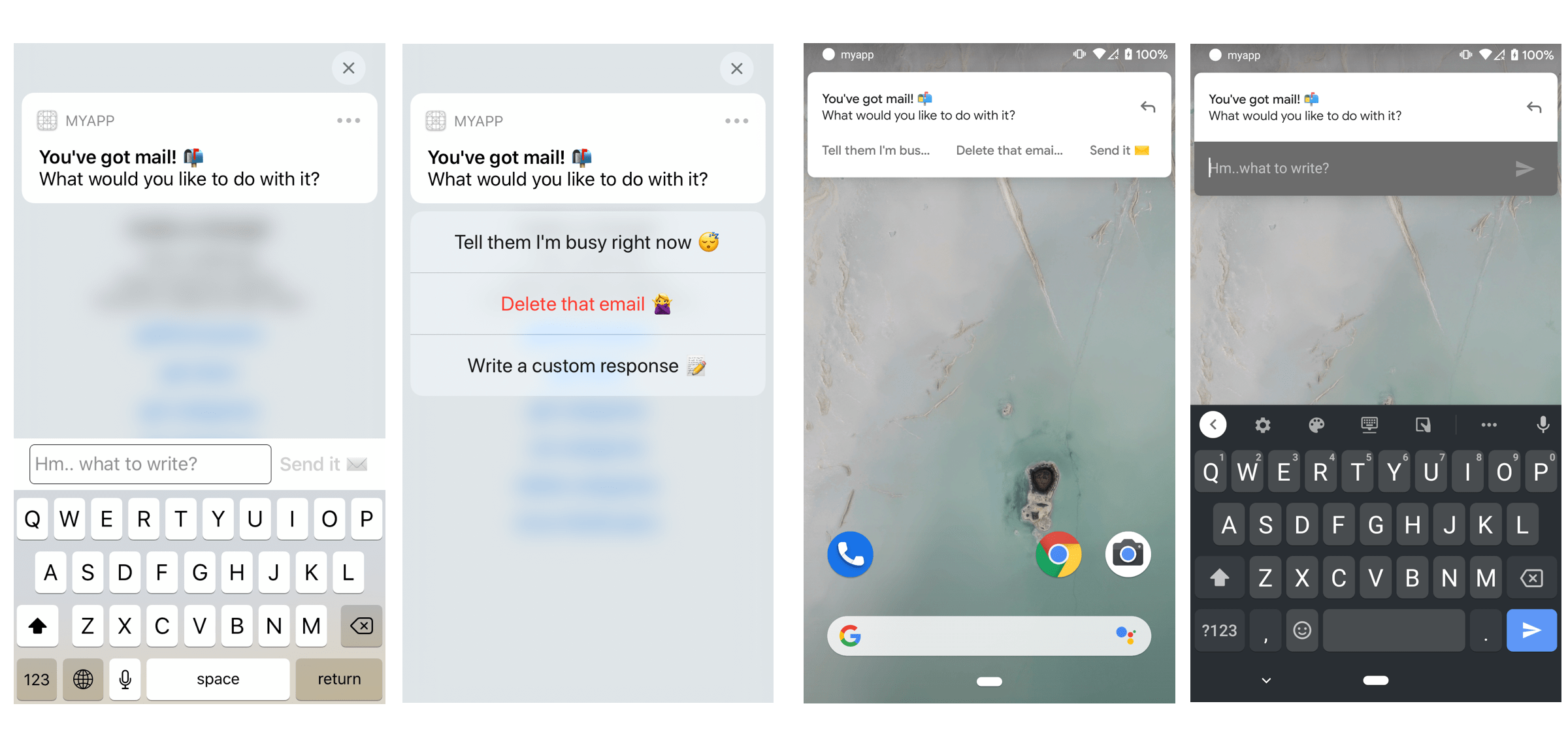
On iOS, notification categories also allow you to customize your notifications further. With each category, not only can you set interactive actions a user can take, but you can also configure things like the placeholder text to display when the user disables notification previews for your app.
Handling notification channels
Android 8+
Starting in Android 8.0 (API level 26), all notifications must be assigned to a channel. For each channel, you can set the visual and auditory behavior that is applied to all notifications in that channel. Then, users can change these settings and decide which notification channels from your app should be intrusive or visible at all, as Android developer docs states.
If you do not specify a notification channel, expo-notifications will create a fallback channel for you, named Miscellaneous. We encourage you to always ensure appropriate channels with informative names are set up for the application and to always send notifications to these channels.
Calling these methods is a no-op for platforms that do not support this feature (Android below version 8.0 (26) and iOS).
Custom notification icon and colors
Android
You can configure the notification.icon
and notification.color
keys in the project's app.json if you are using Expo Prebuild
or by using the expo-notifications config plugin directly
. These are build-time settings, so you'll need to recompile your native Android app with eas build -p android or npx expo run:android to see the changes.
For your notification icon, make sure you follow Google's design guidelines (the icon must be all white with a transparent background) or else it may not be displayed as intended.
You can also set a custom notification color per-notification directly in your NotificationContentInput
under the color attribute.
import * as Notifications from 'expo-notifications';
Fetch tokens for push notifications
addPushTokenListener(listener)
| Parameter | Type | Description |
| --- | --- | --- |
| listener | [PushTokenListener](https://docs.expo.dev/versions/latest/sdk/notifications#pushtokenlistenertoken) | A function accepting a push token as an argument, it will be called whenever the push token changes. |
In rare situations, a push token may be changed by the push notification service while the app is running. When a token is rolled, the old one becomes invalid and sending notifications to it will fail. A push token listener will let you handle this situation gracefully by registering the new token with your backend right away.
Returns:
EventSubscription
An EventSubscription
object represents the subscription of the provided listener.
Example
import React from 'react'; import * as Notifications from 'expo-notifications'; import { registerDevicePushTokenAsync } from '../api'; export default function App() { React.useEffect(() => { const subscription = Notifications.addPushTokenListener(registerDevicePushTokenAsync); return () => subscription.remove(); }, []); return ( // Your app content ); }
getDevicePushTokenAsync()
Returns a native FCM, APNs token or a PushSubscription data
that can be used with another push notification service.
Returns:
[Promise](https://developer.mozilla.org/en-US/docs/Web/JavaScript/Reference/Global_Objects/Promise) <[DevicePushToken](https://docs.expo.dev/versions/v53.0.0/sdk/notifications#devicepushtoken) >
getExpoPushTokenAsync(options)
| Parameter | Type | Description |
| --- | --- | --- |
| options(optional) | [ExpoPushTokenOptions](https://docs.expo.dev/versions/v53.0.0/sdk/notifications#expopushtokenoptions) | Object allowing you to pass in push notification configuration.<br><br>Default:{} |
Returns an Expo token that can be used to send a push notification to the device using Expo's push notifications service.
This method makes requests to the Expo's servers. It can get rejected in cases where the request itself fails (for example, due to the device being offline, experiencing a network timeout, or other HTTPS request failures). To provide offline support to your users, you should try/catch this method and implement retry logic to attempt to get the push token later, once the device is back online.
For Expo's backend to be able to send notifications to your app, you will need to provide it with push notification keys. For more information, see credentials in the push notifications setup.
Returns:
[Promise](https://developer.mozilla.org/en-US/docs/Web/JavaScript/Reference/Global_Objects/Promise) <[ExpoPushToken](https://docs.expo.dev/versions/v53.0.0/sdk/notifications#expopushtoken) >
Returns a Promise that resolves to an object representing acquired push token.
Example
import * as Notifications from 'expo-notifications'; export async function registerForPushNotificationsAsync(userId: string) { const expoPushToken = await Notifications.getExpoPushTokenAsync({ projectId: 'your-project-id', }); await fetch('https://example.com/', { method: 'POST', headers: { 'Content-Type': 'application/json', }, body: JSON.stringify({ userId, expoPushToken, }), }); }
Show More
Deprecated call
remove()on the subscription object instead.Removes a push token subscription returned by an
addPushTokenListenercall.
removePushTokenSubscription(subscription)
| Parameter | Type | Description |
| --- | --- | --- |
| subscription | EventSubscription | A subscription returned by addPushTokenListener method. |
Returns:
void
addNotificationReceivedListener(listener)
| Parameter | Type | Description |
| --- | --- | --- |
| listener | (event: [Notification](https://docs.expo.dev/versions/v53.0.0/sdk/notifications#notification) ) => void | A function accepting a notification (Notification<br>) as an argument. |
Listeners registered by this method will be called whenever a notification is received while the app is running.
Returns:
EventSubscription
An EventSubscription
object represents the subscription of the provided listener.
Example
import React from 'react'; import * as Notifications from 'expo-notifications'; export default function App() { React.useEffect(() => { const subscription = Notifications.addNotificationReceivedListener(notification => { console.log(notification); }); return () => subscription.remove(); }, []); return ( // Your app content ); }
addNotificationResponseReceivedListener(listener)
| Parameter | Type | Description |
| --- | --- | --- |
| listener | (event: [NotificationResponse](https://docs.expo.dev/versions/v53.0.0/sdk/notifications#notificationresponse) ) => void | A function accepting notification response (NotificationResponse<br>) as an argument. |
Listeners registered by this method will be called whenever a user interacts with a notification (for example, taps on it).
Returns:
EventSubscription
An EventSubscription
object represents the subscription of the provided listener.
Example
import React from 'react'; import { Linking } from 'react-native'; import * as Notifications from 'expo-notifications'; export default function Container() { React.useEffect(() => { const subscription = Notifications.addNotificationResponseReceivedListener(response => { const url = response.notification.request.content.data.url; Linking.openURL(url); }); return () => subscription.remove(); }, []); return ( // Your app content ); }
addNotificationsDroppedListener(listener)
| Parameter | Type | Description |
| --- | --- | --- |
| listener | () => void | A callback function. |
Listeners registered by this method will be called whenever some notifications have been dropped by the server. Applicable only to Firebase Cloud Messaging which we use as a notifications service on Android. It corresponds to onDeletedMessages() callback. More information can be found in Firebase docs
.
Returns:
EventSubscription
An EventSubscription
object represents the subscription of the provided listener.
Deprecated call
remove()on the subscription object instead.Removes a notification subscription returned by an
addNotificationListenercall.
removeNotificationSubscription(subscription)
| Parameter | Type | Description |
| --- | --- | --- |
| subscription | EventSubscription | A subscription returned by addNotificationListener method. |
Returns:
void
useLastNotificationResponse()
A React hook which returns the notification response that was received most recently (a notification response designates an interaction with a notification, such as tapping on it).
To clear the last notification response, use clearLastNotificationResponseAsync()
.
If you don't want to use a hook, you can use
Notifications.getLastNotificationResponseAsync()instead.
Returns:
[MaybeNotificationResponse](https://docs.expo.dev/versions/v53.0.0/sdk/notifications#maybenotificationresponse)
The hook may return one of these three types/values:
undefined- until we're sure of what to return,null- if no notification response has been received yet,- a
NotificationResponseobject - if a notification response was received.
Example
Responding to a notification tap by opening a URL that could be put into the notification's data (opening the URL is your responsibility and is not a part of the expo-notifications API):
import * as Notifications from 'expo-notifications'; import { Linking } from 'react-native'; export default function App() { const lastNotificationResponse = Notifications.useLastNotificationResponse(); React.useEffect(() => { if ( lastNotificationResponse && lastNotificationResponse.notification.request.content.data.url && lastNotificationResponse.actionIdentifier === Notifications.DEFAULT_ACTION_IDENTIFIER ) { Linking.openURL(lastNotificationResponse.notification.request.content.data.url); } }, [lastNotificationResponse]); return ( // Your app content ); }
Show More
Present incoming notifications when the app is running
setNotificationHandler(handler)
| Parameter | Type | Description |
| --- | --- | --- |
| handler | null \| [NotificationHandler](https://docs.expo.dev/versions/v53.0.0/sdk/notifications#notificationhandler) | A single parameter which should be either null (if you want to clear the handler) or a NotificationHandler<br> object. |
When a notification is received while the app is running, using this function you can set a callback that will decide whether the notification should be shown to the user or not.
When a notification is received, handleNotification is called with the incoming notification as an argument. The function should respond with a behavior object within 3 seconds, otherwise, the notification will be discarded. If the notification is handled successfully, handleSuccess is called with the identifier of the notification, otherwise (or on timeout) handleError will be called.
The default behavior when the handler is not set or does not respond in time is not to show the notification.
Returns:
void
Example
import * as Notifications from 'expo-notifications'; Notifications.setNotificationHandler({ handleNotification: async () => ({ shouldShowBanner: true, shouldShowList: true, shouldPlaySound: false, shouldSetBadge: false, }), });
Run JavaScript in response to incoming notifications
registerTaskAsync(taskName)
| Parameter | Type | Description |
| --- | --- | --- |
| taskName | string | The string you passed to TaskManager.defineTask as the taskName parameter. |
Call registerTaskAsync to set a callback (task) that runs when a notification is received while the app is in foreground, background, or terminated. Only on Android, the task also runs in response to a notification action press when the app is backgrounded or terminated. When the app is terminated, only a Headless Background Notification
triggers the task execution. However, the OS may decide not to deliver the notification to your app in some cases (e.g. when the device is in Doze mode on Android, or when you send too many notifications - Apple recommends to not "send more than two or three per hour"
).
Under the hood, this function is run using expo-task-manager. You must define the task first, with TaskManager.defineTask
and register it with registerTaskAsync.
Make sure you define and register the task in the module scope of a JS module which is required early by your app (e.g. in the index.js file). expo-task-manager loads your app's JS bundle in the background and executes the task, as well as any side effects which may happen as a consequence of requiring any JS modules.
The callback function you define with TaskManager.defineTask receives an object with the following fields:
data: The remote payload delivered by either FCM (Android) or APNs (iOS). SeeNotificationTaskPayloadfor details.error: The error (if any) that occurred during execution of the task.executionInfo: JSON object of additional info related to the task, including thetaskName.
Returns:
[Promise](https://developer.mozilla.org/en-US/docs/Web/JavaScript/Reference/Global_Objects/Promise) <null>
Example
import * as TaskManager from 'expo-task-manager'; import * as Notifications from 'expo-notifications'; const BACKGROUND_NOTIFICATION_TASK = 'BACKGROUND-NOTIFICATION-TASK'; defineTask<Notifications.NotificationTaskPayload>(BACKGROUND_NOTIFICATION_TASK, ({ data, error, executionInfo }) => { console.log('Received a notification task payload!'); const isNotificationResponse = 'actionIdentifier' in taskPayload; if (isNotificationResponse) { // Do something with the notification response from user } else { // Do something with the data from notification that was received } }); Notifications.registerTaskAsync(BACKGROUND_NOTIFICATION_TASK);
unregisterTaskAsync(taskName)
| Parameter | Type | Description |
| --- | --- | --- |
| taskName | string | The string you passed to registerTaskAsync as the taskName parameter. |
Used to unregister tasks registered with registerTaskAsync method.
Returns:
[Promise](https://developer.mozilla.org/en-US/docs/Web/JavaScript/Reference/Global_Objects/Promise) <null>
Fetch information about notifications-related permissions
getPermissionsAsync()
Calling this function checks current permissions settings related to notifications. It lets you verify whether the app is currently allowed to display alerts, play sounds, etc. There is no user-facing effect of calling this.
Returns:
[Promise](https://developer.mozilla.org/en-US/docs/Web/JavaScript/Reference/Global_Objects/Promise) <[NotificationPermissionsStatus](https://docs.expo.dev/versions/v53.0.0/sdk/notifications#notificationpermissionsstatus) >
It returns a Promise resolving to an object represents permission settings (NotificationPermissionsStatus
). On iOS, make sure you properly interpret the permissions response
.
Example
import * as Notifications from 'expo-notifications'; export async function allowsNotificationsAsync() { const settings = await Notifications.getPermissionsAsync(); return ( settings.granted || settings.ios?.status === Notifications.IosAuthorizationStatus.PROVISIONAL ); }
requestPermissionsAsync(permissions)
| Parameter | Type | Description |
| --- | --- | --- |
| permissions(optional) | [NotificationPermissionsRequest](https://docs.expo.dev/versions/v53.0.0/sdk/notifications#notificationpermissionsrequest) | An object representing configuration for the request scope. |
Prompts the user for notification permissions according to request. Request defaults to asking the user to allow displaying alerts, setting badge count and playing sounds.
Returns:
[Promise](https://developer.mozilla.org/en-US/docs/Web/JavaScript/Reference/Global_Objects/Promise) <[NotificationPermissionsStatus](https://docs.expo.dev/versions/v53.0.0/sdk/notifications#notificationpermissionsstatus) >
It returns a Promise resolving to an object represents permission settings (NotificationPermissionsStatus
). On iOS, make sure you properly interpret the permissions response
.
Example
import * as Notifications from 'expo-notifications'; export function requestPermissionsAsync() { return Notifications.requestPermissionsAsync({ ios: { allowAlert: true, allowBadge: true, allowSound: true, }, }); }
getBadgeCountAsync()
Fetches the number currently set as the badge of the app icon on device's home screen. A 0 value means that the badge is not displayed.
Note: Not all Android launchers support application badges. If the launcher does not support icon badges, the method will always resolve to
0.
Returns:
[Promise](https://developer.mozilla.org/en-US/docs/Web/JavaScript/Reference/Global_Objects/Promise) <number>
Returns a Promise resolving to a number that represents the current badge of the app icon.
setBadgeCountAsync(badgeCount, options)
| Parameter | Type | Description |
| --- | --- | --- |
| badgeCount | number | The count which should appear on the badge. A value of 0 will clear the badge. |
| options(optional) | [SetBadgeCountOptions](https://docs.expo.dev/versions/v53.0.0/sdk/notifications#setbadgecountoptions) | An object of options configuring behavior applied. |
Sets the badge of the app's icon to the specified number. Setting it to 0 clears the badge. On iOS, this method requires that you have requested the user's permission for allowBadge via requestPermissionsAsync
, otherwise it will automatically return false.
Note: Not all Android launchers support application badges. If the launcher does not support icon badges, the method will resolve to
false.
Returns:
[Promise](https://developer.mozilla.org/en-US/docs/Web/JavaScript/Reference/Global_Objects/Promise) <boolean>
It returns a Promise resolving to a boolean representing whether the setting of the badge succeeded.
cancelAllScheduledNotificationsAsync()
Cancels all scheduled notifications.
Returns:
[Promise](https://developer.mozilla.org/en-US/docs/Web/JavaScript/Reference/Global_Objects/Promise) <void>
A Promise that resolves once all the scheduled notifications are successfully canceled, or if there are no scheduled notifications.
cancelScheduledNotificationAsync(identifier)
| Parameter | Type | Description |
| --- | --- | --- |
| identifier | string | The notification identifier with which scheduleNotificationAsync method resolved when the notification has been scheduled. |
Cancels a single scheduled notification. The scheduled notification of given ID will not trigger.
Returns:
[Promise](https://developer.mozilla.org/en-US/docs/Web/JavaScript/Reference/Global_Objects/Promise) <void>
A Promise resolves once the scheduled notification is successfully canceled or if there is no scheduled notification for a given identifier.
Example
import * as Notifications from 'expo-notifications'; async function scheduleAndCancel() { const identifier = await Notifications.scheduleNotificationAsync({ content: { title: 'Hey!', }, trigger: { seconds: 60, repeats: true }, }); await Notifications.cancelScheduledNotificationAsync(identifier); }
getAllScheduledNotificationsAsync()
Fetches information about all scheduled notifications.
Returns:
[Promise](https://developer.mozilla.org/en-US/docs/Web/JavaScript/Reference/Global_Objects/Promise) <[NotificationRequest[]](https://docs.expo.dev/versions/v53.0.0/sdk/notifications#notificationrequest) >
Returns a Promise resolving to an array of objects conforming to the Notification
interface.
getNextTriggerDateAsync(trigger)
| Parameter | Type | Description |
| --- | --- | --- |
| trigger | [SchedulableNotificationTriggerInput](https://docs.expo.dev/versions/v53.0.0/sdk/notifications#schedulablenotificationtriggerinput) | The schedulable notification trigger you would like to check next trigger date for (of type SchedulableNotificationTriggerInput<br>). |
Allows you to check what will be the next trigger date for given notification trigger input.
Returns:
[Promise](https://developer.mozilla.org/en-US/docs/Web/JavaScript/Reference/Global_Objects/Promise) <number | null>
If the return value is null, the notification won't be triggered. Otherwise, the return value is the Unix timestamp in milliseconds at which the notification will be triggered.
Example
import * as Notifications from 'expo-notifications'; async function logNextTriggerDate() { try { const nextTriggerDate = await Notifications.getNextTriggerDateAsync({ hour: 9, minute: 0, }); console.log(nextTriggerDate === null ? 'No next trigger date' : new Date(nextTriggerDate)); } catch (e) { console.warn(`Couldn't have calculated next trigger date: ${e}`); } }
scheduleNotificationAsync(request)
| Parameter | Type | Description |
| --- | --- | --- |
| request | [NotificationRequestInput](https://docs.expo.dev/versions/v53.0.0/sdk/notifications#notificationrequestinput) | An object describing the notification to be triggered. |
Schedules a notification to be triggered in the future.
Note: This does not mean that the notification will be presented when it is triggered. For the notification to be presented you have to set a notification handler with
setNotificationHandlerthat will return an appropriate notification behavior. For more information see the example below.
Returns:
[Promise](https://developer.mozilla.org/en-US/docs/Web/JavaScript/Reference/Global_Objects/Promise) <string>
Returns a Promise resolving to a string which is a notification identifier you can later use to cancel the notification or to identify an incoming notification.
Example
Schedule the notification that will trigger once, in one minute from now
import * as Notifications from 'expo-notifications'; Notifications.scheduleNotificationAsync({ content: { title: "Time's up!", body: 'Change sides!', }, trigger: { type: Notifications.SchedulableTriggerInputTypes.TIME_INTERVAL, seconds: 60, }, });
Schedule the notification that will trigger repeatedly, every 20 minutes
import * as Notifications from 'expo-notifications'; Notifications.scheduleNotificationAsync({ content: { title: 'Remember to drink water!', }, trigger: { type: Notifications.SchedulableTriggerInputTypes.TIME_INTERVAL, seconds: 60 * 20, repeats: true, }, });
Schedule the notification that will trigger once, at the beginning of next hour
import * as Notifications from 'expo-notifications'; const date = new Date(Date.now() + 60 * 60 * 1000); date.setMinutes(0); date.setSeconds(0); Notifications.scheduleNotificationAsync({ content: { title: 'Happy new hour!', }, trigger: { type: Notifications.SchedulableTriggerInputTypes.DATE, date }, });
dismissAllNotificationsAsync()
Removes all application's notifications displayed in the notification tray (Notification Center).
Returns:
[Promise](https://developer.mozilla.org/en-US/docs/Web/JavaScript/Reference/Global_Objects/Promise) <void>
A Promise which resolves once the request to dismiss the notifications is successfully dispatched to the notifications manager.
dismissNotificationAsync(notificationIdentifier)
| Parameter | Type | Description |
| --- | --- | --- |
| notificationIdentifier | string | The notification identifier, obtained either via setNotificationHandler method or in the listener added with addNotificationReceivedListener. |
Removes notification displayed in the notification tray (Notification Center).
Returns:
[Promise](https://developer.mozilla.org/en-US/docs/Web/JavaScript/Reference/Global_Objects/Promise) <void>
A Promise which resolves once the request to dismiss the notification is successfully dispatched to the notifications manager.
getPresentedNotificationsAsync()
Fetches information about all notifications present in the notification tray (Notification Center).
This method is not supported on Android below 6.0 (API level 23) – on these devices it will resolve to an empty array.
Returns:
[Promise](https://developer.mozilla.org/en-US/docs/Web/JavaScript/Reference/Global_Objects/Promise) <[Notification[]](https://docs.expo.dev/versions/v53.0.0/sdk/notifications#notification) >
A Promise which resolves with a list of notifications (Notification
) currently present in the notification tray (Notification Center).
Manage notification channels (Android-specific)
deleteNotificationChannelAsync(channelId)
Only for:
Android
| Parameter | Type | Description |
| --- | --- | --- |
| channelId | string | The channel identifier. |
Removes the notification channel.
Returns:
[Promise](https://developer.mozilla.org/en-US/docs/Web/JavaScript/Reference/Global_Objects/Promise) <void>
A Promise which resolving once the channel is removed (or if there was no channel for given identifier).
deleteNotificationChannelGroupAsync(groupId)
Only for:
Android
| Parameter | Type | Description |
| --- | --- | --- |
| groupId | string | The channel group identifier. |
Removes the notification channel group and all notification channels that belong to it.
Returns:
[Promise](https://developer.mozilla.org/en-US/docs/Web/JavaScript/Reference/Global_Objects/Promise) <void>
A Promise which resolves once the channel group is removed (or if there was no channel group for given identifier).
getNotificationChannelAsync(channelId)
Only for:
Android
| Parameter | Type | Description |
| --- | --- | --- |
| channelId | string | The channel's identifier. |
Fetches information about a single notification channel.
Returns:
[Promise](https://developer.mozilla.org/en-US/docs/Web/JavaScript/Reference/Global_Objects/Promise) <[NotificationChannel](https://docs.expo.dev/versions/v53.0.0/sdk/notifications#notificationchannel) | null>
A Promise which resolves to the channel object (of type NotificationChannel
) or to null if there was no channel found for this identifier. On platforms that do not support notification channels, it will always resolve to null.
getNotificationChannelGroupAsync(groupId)
Only for:
Android
| Parameter | Type | Description |
| --- | --- | --- |
| groupId | string | The channel group's identifier. |
Fetches information about a single notification channel group.
Returns:
[Promise](https://developer.mozilla.org/en-US/docs/Web/JavaScript/Reference/Global_Objects/Promise) <[NotificationChannelGroup](https://docs.expo.dev/versions/v53.0.0/sdk/notifications#notificationchannelgroup) | null>
A Promise which resolves to the channel group object (of type NotificationChannelGroup
) or to null if there was no channel group found for this identifier. On platforms that do not support notification channels, it will always resolve to null.
getNotificationChannelGroupsAsync()
Only for:
Android
Fetches information about all known notification channel groups.
Returns:
[Promise](https://developer.mozilla.org/en-US/docs/Web/JavaScript/Reference/Global_Objects/Promise) <[NotificationChannelGroup[]](https://docs.expo.dev/versions/v53.0.0/sdk/notifications#notificationchannelgroup) >
A Promise which resoles to an array of channel groups. On platforms that do not support notification channel groups, it will always resolve to an empty array.
getNotificationChannelsAsync()
Only for:
Android
Fetches information about all known notification channels.
Returns:
[Promise](https://developer.mozilla.org/en-US/docs/Web/JavaScript/Reference/Global_Objects/Promise) <[NotificationChannel[]](https://docs.expo.dev/versions/v53.0.0/sdk/notifications#notificationchannel) >
A Promise which resolves to an array of channels. On platforms that do not support notification channels, it will always resolve to an empty array.
setNotificationChannelAsync(channelId, channel)
Only for:
Android
| Parameter | Type | Description |
| --- | --- | --- |
| channelId | string | The channel identifier. |
| channel | [NotificationChannelInput](https://docs.expo.dev/versions/v53.0.0/sdk/notifications#notificationchannelinput) | Object representing the channel's configuration. |
Assigns the channel configuration to a channel of a specified name (creating it if need be). This method lets you assign given notification channel to a notification channel group.
Note: After a channel has been created, you can modify only its name and description. This limitation is imposed by the Android OS.
Note: For some settings to be applied on all Android versions, it may be necessary to duplicate the configuration across both a single notification and its respective notification channel.
For example, for a notification to play a custom sound on Android versions below 8.0, the custom notification sound has to be set on the notification (through the NotificationContentInput
), and for the custom sound to play on Android versions above 8.0, the relevant notification channel must have the custom sound configured (through the NotificationChannelInput
). For more information, see Set custom notification sounds on Android
.
Returns:
[Promise](https://developer.mozilla.org/en-US/docs/Web/JavaScript/Reference/Global_Objects/Promise) <[NotificationChannel](https://docs.expo.dev/versions/v53.0.0/sdk/notifications#notificationchannel) | null>
A Promise which resolving to the object (of type NotificationChannel
) describing the modified channel or to null if the platform does not support notification channels.
setNotificationChannelGroupAsync(groupId, group)
Only for:
Android
| Parameter | Type | Description |
| --- | --- | --- |
| groupId | string | The channel group's identifier. |
| group | [NotificationChannelGroupInput](https://docs.expo.dev/versions/v53.0.0/sdk/notifications#notificationchannelgroupinput) | Object representing the channel group configuration. |
Assigns the channel group configuration to a channel group of a specified name (creating it if need be).
Returns:
[Promise](https://developer.mozilla.org/en-US/docs/Web/JavaScript/Reference/Global_Objects/Promise) <[NotificationChannelGroup](https://docs.expo.dev/versions/v53.0.0/sdk/notifications#notificationchannelgroup) | null>
A Promise resolving to the object (of type NotificationChannelGroup
) describing the modified channel group or to null if the platform does not support notification channels.
Manage notification categories (interactive notifications)
deleteNotificationCategoryAsync(identifier)
Only for:
Android
iOS
| Parameter | Type | Description |
| --- | --- | --- |
| identifier | string | Identifier initially provided to setNotificationCategoryAsync when creating the category. |
Deletes the category associated with the provided identifier.
Returns:
[Promise](https://developer.mozilla.org/en-US/docs/Web/JavaScript/Reference/Global_Objects/Promise) <boolean>
A Promise which resolves to true if the category was successfully deleted, or false if it was not. An example of when this method would return false is if you try to delete a category that doesn't exist.
getNotificationCategoriesAsync()
Only for:
Android
iOS
Fetches information about all known notification categories.
Returns:
[Promise](https://developer.mozilla.org/en-US/docs/Web/JavaScript/Reference/Global_Objects/Promise) <[NotificationCategory[]](https://docs.expo.dev/versions/v53.0.0/sdk/notifications#notificationcategory) >
A Promise which resolves to an array of NotificationCategorys. On platforms that do not support notification channels, it will always resolve to an empty array.
setNotificationCategoryAsync(identifier, actions, options)
Only for:
Android
iOS
| Parameter | Type | Description |
| --- | --- | --- |
| identifier | string | A string to associate as the ID of this category. You will pass this string in as the categoryIdentifier in your NotificationContent<br> to associate a notification with this category.<br><br>> Don't use the characters : or - in your category identifier. If you do, categories might not work as expected. |
| actions | [NotificationAction[]](https://docs.expo.dev/versions/v53.0.0/sdk/notifications#notificationaction) | An array of NotificationAction<br>, which describe the actions associated with this category. |
| options(optional) | [NotificationCategoryOptions](https://docs.expo.dev/versions/v53.0.0/sdk/notifications#notificationcategoryoptions) | An optional object of additional configuration options for your category. |
Sets the new notification category.
Returns:
[Promise](https://developer.mozilla.org/en-US/docs/Web/JavaScript/Reference/Global_Objects/Promise) <[NotificationCategory](https://docs.expo.dev/versions/v53.0.0/sdk/notifications#notificationcategory) >
A Promise which resolves to the category you just have created.
Notifications.DEFAULT_ACTION_IDENTIFIER
Type: 'expo.modules.notifications.actions.DEFAULT'
Notifications.clearLastNotificationResponseAsync()
Clears the notification response that was received most recently. May be used when an app selects a route based on the notification response, and it is undesirable to continue selecting the route after the response has already been handled.
If a component is using the useLastNotificationResponse
hook, this call will also clear the value returned by the hook.
Returns:
[Promise](https://developer.mozilla.org/en-US/docs/Web/JavaScript/Reference/Global_Objects/Promise) <void>
A promise that resolves if the native call was successful.
Notifications.getLastNotificationResponseAsync()
Gets the notification response that was received most recently (a notification response designates an interaction with a notification, such as tapping on it).
null- if no notification response has been received yet- a
NotificationResponseobject - if a notification response was received
Returns:
[Promise](https://developer.mozilla.org/en-US/docs/Web/JavaScript/Reference/Global_Objects/Promise) <[NotificationResponse](https://docs.expo.dev/versions/v53.0.0/sdk/notifications#notificationresponse) | null>
Notifications.unregisterForNotificationsAsync()
Returns:
[Promise](https://developer.mozilla.org/en-US/docs/Web/JavaScript/Reference/Global_Objects/Promise) <void>
AudioAttributes
| Property | Type | Description |
| --- | --- | --- |
| contentType | [AndroidAudioContentType](https://docs.expo.dev/versions/v53.0.0/sdk/notifications#androidaudiocontenttype) | - |
| flags | { enforceAudibility: boolean, requestHardwareAudioVideoSynchronization: boolean } | - |
| usage | [AndroidAudioUsage](https://docs.expo.dev/versions/v53.0.0/sdk/notifications#androidaudiousage) | - |
BeaconRegion
Only for:
iOS
Extends: [Region](https://docs.expo.dev/versions/v53.0.0/sdk/notifications#region)
A region used to detect the presence of iBeacon devices. Based on Core Location CLBeaconRegion
class.
| Property | Type | Description |
| --- | --- | --- |
| beaconIdentityConstraint(optional) | { major: null \| number, minor: null \| number, uuid: string } | The beacon identity constraint that defines the beacon region. |
| major | null \| number | The major value from the beacon identity constraint that defines the beacon region. |
| minor | null \| number | The minor value from the beacon identity constraint that defines the beacon region. |
| notifyEntryStateOnDisplay | boolean | A Boolean value that indicates whether Core Location sends beacon notifications when the device’s display is on. |
| type | 'beacon' | - |
| uuid(optional) | string | The UUID value from the beacon identity constraint that defines the beacon region. |
CalendarNotificationTrigger
Only for:
iOS
A trigger related to a UNCalendarNotificationTrigger
.
| Property | Type | Description |
| --- | --- | --- |
| dateComponents | { calendar: string, day: number, era: number, hour: number, isLeapMonth: boolean, minute: number, month: number, nanosecond: number, quarter: number, second: number, timeZone: string, weekday: number, weekdayOrdinal: number, weekOfMonth: number, weekOfYear: number, year: number, yearForWeekOfYear: number } | - |
| repeats | boolean | - |
| type | 'calendar' | - |
CircularRegion
Only for:
iOS
Extends: [Region](https://docs.expo.dev/versions/v53.0.0/sdk/notifications#region)
A circular geographic region, specified as a center point and radius. Based on Core Location CLCircularRegion
class.
| Property | Type | Description |
| --- | --- | --- |
| center | { latitude: number, longitude: number } | The center point of the geographic area. |
| radius | number | The radius (measured in meters) that defines the geographic area’s outer boundary. |
| type | 'circular' | - |
DailyNotificationTrigger
Only for:
Android
A trigger related to a daily notification.
The same functionality will be achieved on iOS with a
CalendarNotificationTrigger.
| Property | Type | Description |
| --- | --- | --- |
| hour | number | - |
| minute | number | - |
| type | 'daily' | - |
EventSubscription
A subscription object that allows to conveniently remove an event listener from the emitter.
remove()
Removes an event listener for which the subscription has been created. After calling this function, the listener will no longer receive any events from the emitter.
Returns:
void
ExpoPushToken
Object which contains the Expo push token in the data field. Use the value from data to send notifications via Expo Notifications service.
| Property | Type | Description |
| --- | --- | --- |
| data | string | The acquired push token. |
| type | 'expo' | Always set to "expo". |
ExpoPushTokenOptions
| Property | Type | Description |
| --- | --- | --- |
| applicationId(optional) | string | The ID of the application to which the token should be attributed. Defaults to Application.applicationId<br> exposed by expo-application. |
| baseUrl(optional) | string | Endpoint URL override. |
| development(optional) | boolean | Only for: <br><br>iOS<br><br> <br><br>On iOS, there are two push notification services: "sandbox" and "production". This defines whether the push token is supposed to be used with the sandbox platform notification service. Defaults to Application.getIosPushNotificationServiceEnvironmentAsync()<br> exposed by expo-application or false. Most probably you won't need to customize that. You may want to customize that if you don't want to install expo-application and still use the sandbox APNs. |
| deviceId(optional) | string | - |
| devicePushToken(optional) | [DevicePushToken](https://docs.expo.dev/versions/v53.0.0/sdk/notifications#devicepushtoken) | The device push token with which to register at the backend. Defaults to a token fetched with getDevicePushTokenAsync()<br>. |
| projectId(optional) | string | The ID of the project to which the token should be attributed. Defaults to Constants.expoConfig.extra.eas.projectId<br> exposed by expo-constants.<br><br>When using EAS Build, this value is automatically set. However, it is recommended to set it manually. Once you have EAS Build configured, you can find the value in app.json under extra.eas.projectId. You can copy and paste it into your code. If you are not using EAS Build, it will fallback to Constants.expoConfig?.extra?.eas?.projectId<br>. |
| type(optional) | string | Request body override. |
| url(optional) | string | Request URL override. |
FirebaseRemoteMessage
A Firebase RemoteMessage that caused the notification to be delivered to the app.
| Property | Type | Description |
| --- | --- | --- |
| collapseKey | null \| string | - |
| data | Record<string, string> | - |
| from | null \| string | - |
| messageId | null \| string | - |
| messageType | null \| string | - |
| notification | null \| [FirebaseRemoteMessageNotification](https://docs.expo.dev/versions/v53.0.0/sdk/notifications#firebaseremotemessagenotification) | - |
| originalPriority | number | - |
| priority | number | - |
| sentTime | number | - |
| to | null \| string | - |
| ttl | number | - |
FirebaseRemoteMessageNotification
| Property | Type | Description |
| --- | --- | --- |
| body | null \| string | - |
| bodyLocalizationArgs | null \| string[] | - |
| bodyLocalizationKey | null \| string | - |
| channelId | null \| string | - |
| clickAction | null \| string | - |
| color | null \| string | - |
| eventTime | null \| number | - |
| icon | null \| string | - |
| imageUrl | null \| string | - |
| lightSettings | null \| number[] | - |
| link | null \| string | - |
| localOnly | boolean | - |
| notificationCount | null \| number | - |
| notificationPriority | null \| number | - |
| sound | null \| string | - |
| sticky | boolean | - |
| tag | null \| string | - |
| ticker | null \| string | - |
| title | null \| string | - |
| titleLocalizationArgs | null \| string[] | - |
| titleLocalizationKey | null \| string | - |
| usesDefaultLightSettings | boolean | - |
| usesDefaultSound | boolean | - |
| usesDefaultVibrateSettings | boolean | - |
| vibrateTimings | null \| number[] | - |
| visibility | null \| number | - |
IosNotificationPermissionsRequest
Available configuration for permission request on iOS platform. See Apple documentation for UNAuthorizationOptions
to learn more.
| Property | Type | Description |
| --- | --- | --- |
| allowAlert(optional) | boolean | The ability to display alerts. |
| allowBadge(optional) | boolean | The ability to update the app’s badge. |
| allowCriticalAlerts(optional) | boolean | The ability to play sounds for critical alerts. |
| allowDisplayInCarPlay(optional) | boolean | The ability to display notifications in a CarPlay environment. |
| allowProvisional(optional) | boolean | The ability to post noninterrupting notifications provisionally to the Notification Center. |
| allowSound(optional) | boolean | The ability to play sounds. |
| provideAppNotificationSettings(optional) | boolean | An option indicating the system should display a button for in-app notification settings. |
LocationNotificationTrigger
Only for:
iOS
A trigger related to a UNLocationNotificationTrigger
.
| Property | Type | Description |
| --- | --- | --- |
| region | [CircularRegion](https://docs.expo.dev/versions/v53.0.0/sdk/notifications#circularregion) \| [BeaconRegion](https://docs.expo.dev/versions/v53.0.0/sdk/notifications#beaconregion) | - |
| repeats | boolean | - |
| type | 'location' | - |
MonthlyNotificationTrigger
Only for:
Android
A trigger related to a monthly notification.
The same functionality will be achieved on iOS with a
CalendarNotificationTrigger.
| Property | Type | Description |
| --- | --- | --- |
| day | number | - |
| hour | number | - |
| minute | number | - |
| type | 'monthly' | - |
NativeDevicePushToken
| Property | Type | Description |
| --- | --- | --- |
| data | string | - |
| type | 'ios' \| 'android' | - |
Notification
An object which represents a single notification that has been triggered by some request (NotificationRequest
) at some point in time.
| Property | Type | Description |
| --- | --- | --- |
| date | number | - |
| request | [NotificationRequest](https://docs.expo.dev/versions/v53.0.0/sdk/notifications#notificationrequest) | - |
NotificationAction
| Property | Type | Description |
| --- | --- | --- |
| buttonTitle | string | The title of the button triggering this action. |
| identifier | string | A unique string that identifies this action. If a user takes this action (for example, selects this button in the system's Notification UI), your app will receive this actionIdentifier via the NotificationResponseReceivedListener<br>. |
| options(optional) | { isAuthenticationRequired: boolean, isDestructive: boolean, opensAppToForeground: boolean } | Object representing the additional configuration options. |
| textInput(optional) | { placeholder: string, submitButtonTitle: string } | Object which, if provided, will result in a button that prompts the user for a text response. |
NotificationBehavior
An object which represents behavior that should be applied to the incoming notification. On Android, this influences whether the notification is shown, a sound is played, and priority. On iOS, this maps directly to UNNotificationPresentationOptions
.
On Android, setting
shouldPlaySound: falsewill result in the drop-down notification alert not showing, no matter what the priority is. This setting will also override any channel-specific sounds you may have configured.
| Property | Type | Description |
| --- | --- | --- |
| priority(optional) | [AndroidNotificationPriority](https://docs.expo.dev/versions/v53.0.0/sdk/notifications#androidnotificationpriority) | - |
| shouldPlaySound | boolean | - |
| shouldSetBadge | boolean | Only for: <br><br>iOS<br><br> <br><br>- |
| shouldShowAlert(optional) | boolean | > Deprecated instead, specify shouldShowBanner and / or shouldShowList |
| shouldShowBanner | boolean | - |
| shouldShowList | boolean | - |
NotificationCategory
| Property | Type | Description |
| --- | --- | --- |
| actions | [NotificationAction[]](https://docs.expo.dev/versions/v53.0.0/sdk/notifications#notificationaction) | - |
| identifier | string | - |
| options(optional) | [NotificationCategoryOptions](https://docs.expo.dev/versions/v53.0.0/sdk/notifications#notificationcategoryoptions) | - |
NotificationChannel
Only for:
Android
An object which represents a notification channel.
| Property | Type | Description |
| --- | --- | --- |
| audioAttributes | [AudioAttributes](https://docs.expo.dev/versions/v53.0.0/sdk/notifications#audioattributes) | - |
| bypassDnd | boolean | - |
| description | null \| string | - |
| enableLights | boolean | - |
| enableVibrate | boolean | - |
| groupId(optional) | null \| string | - |
| id | string | - |
| importance | [AndroidImportance](https://docs.expo.dev/versions/v53.0.0/sdk/notifications#androidimportance) | - |
| lightColor | string | - |
| lockscreenVisibility | [AndroidNotificationVisibility](https://docs.expo.dev/versions/v53.0.0/sdk/notifications#androidnotificationvisibility) | - |
| name | null \| string | - |
| showBadge | boolean | - |
| sound | null \| 'default' \| 'custom' | - |
| vibrationPattern | null \| number[] | - |
NotificationChannelGroup
Only for:
Android
An object which represents a notification channel group.
| Property | Type | Description |
| --- | --- | --- |
| channels | [NotificationChannel[]](https://docs.expo.dev/versions/v53.0.0/sdk/notifications#notificationchannel) | - |
| description(optional) | null \| string | - |
| id | string | - |
| isBlocked(optional) | boolean | - |
| name | null \| string | - |
NotificationChannelGroupInput
Only for:
Android
An object which represents a notification channel group to be set.
| Property | Type | Description |
| --- | --- | --- |
| description(optional) | null \| string | - |
| name | null \| string | - |
NotificationChannelGroupManager
Extends: ProxyNativeModule
| Property | Type | Description |
| --- | --- | --- |
| deleteNotificationChannelGroupAsync(optional) | (groupId: string) => [Promise](https://developer.mozilla.org/en-US/docs/Web/JavaScript/Reference/Global_Objects/Promise) <void> | - |
| getNotificationChannelGroupAsync(optional) | (groupId: string) => [Promise](https://developer.mozilla.org/en-US/docs/Web/JavaScript/Reference/Global_Objects/Promise) <null \| [NotificationChannelGroup](https://docs.expo.dev/versions/v53.0.0/sdk/notifications#notificationchannelgroup) > | - |
| getNotificationChannelGroupsAsync(optional) | () => [Promise](https://developer.mozilla.org/en-US/docs/Web/JavaScript/Reference/Global_Objects/Promise) <[NotificationChannelGroup[]](https://docs.expo.dev/versions/v53.0.0/sdk/notifications#notificationchannelgroup) > | - |
| setNotificationChannelGroupAsync(optional) | (groupId: string, group: [NotificationChannelGroupInput](https://docs.expo.dev/versions/v53.0.0/sdk/notifications#notificationchannelgroupinput) ) => [Promise](https://developer.mozilla.org/en-US/docs/Web/JavaScript/Reference/Global_Objects/Promise) <null \| [NotificationChannelGroup](https://docs.expo.dev/versions/v53.0.0/sdk/notifications#notificationchannelgroup) > | - |
NotificationChannelManager
Extends: ProxyNativeModule
| Property | Type | Description |
| --- | --- | --- |
| deleteNotificationChannelAsync(optional) | (channelId: string) => [Promise](https://developer.mozilla.org/en-US/docs/Web/JavaScript/Reference/Global_Objects/Promise) <void> | - |
| getNotificationChannelAsync(optional) | (channelId: string) => [Promise](https://developer.mozilla.org/en-US/docs/Web/JavaScript/Reference/Global_Objects/Promise) <null \| [NotificationChannel](https://docs.expo.dev/versions/v53.0.0/sdk/notifications#notificationchannel) > | - |
| getNotificationChannelsAsync(optional) | () => [Promise](https://developer.mozilla.org/en-US/docs/Web/JavaScript/Reference/Global_Objects/Promise) <null \| [NotificationChannel[]](https://docs.expo.dev/versions/v53.0.0/sdk/notifications#notificationchannel) > | - |
| setNotificationChannelAsync(optional) | (channelId: string, channelConfiguration: [NotificationChannelInput](https://docs.expo.dev/versions/v53.0.0/sdk/notifications#notificationchannelinput) ) => [Promise](https://developer.mozilla.org/en-US/docs/Web/JavaScript/Reference/Global_Objects/Promise) <null \| [NotificationChannel](https://docs.expo.dev/versions/v53.0.0/sdk/notifications#notificationchannel) > | - |
NotificationHandler
| Property | Type | Description |
| --- | --- | --- |
| handleError(optional) | (notificationId: string, error: [NotificationHandlingError](https://docs.expo.dev/versions/v53.0.0/sdk/notifications#notificationhandlingerror) ) => void | A function called whenever calling handleNotification() for an incoming notification fails. |
| handleNotification | (notification: [Notification](https://docs.expo.dev/versions/v53.0.0/sdk/notifications#notification) ) => [Promise](https://developer.mozilla.org/en-US/docs/Web/JavaScript/Reference/Global_Objects/Promise) <[NotificationBehavior](https://docs.expo.dev/versions/v53.0.0/sdk/notifications#notificationbehavior) > | A function accepting an incoming notification returning a Promise resolving to a behavior (NotificationBehavior<br>) applicable to the notification |
| handleSuccess(optional) | (notificationId: string) => void | A function called whenever an incoming notification is handled successfully. |
NotificationPermissionsRequest
An interface representing the permissions request scope configuration. Each option corresponds to a different native platform authorization option.
| Property | Type | Description |
| --- | --- | --- |
| android(optional) | object | On Android, all available permissions are granted by default, and if a user declines any permission, an app cannot prompt the user to change. |
| ios(optional) | [IosNotificationPermissionsRequest](https://docs.expo.dev/versions/v53.0.0/sdk/notifications#iosnotificationpermissionsrequest) | Available configuration for permission request on iOS platform. |
NotificationPermissionsStatus
Extends: PermissionResponse
An object obtained by permissions get and request functions.
| Property | Type | Description |
| --- | --- | --- |
| android(optional) | { importance: number, interruptionFilter: number } | - |
| ios(optional) | { alertStyle: [IosAlertStyle](https://docs.expo.dev/versions/v53.0.0/sdk/notifications#iosalertstyle) , allowsAlert: null \| boolean, allowsAnnouncements: null \| boolean, allowsBadge: null \| boolean, allowsCriticalAlerts: null \| boolean, allowsDisplayInCarPlay: null \| boolean, allowsDisplayInNotificationCenter: null \| boolean, allowsDisplayOnLockScreen: null \| boolean, allowsPreviews: [IosAllowsPreviews](https://docs.expo.dev/versions/v53.0.0/sdk/notifications#iosallowspreviews) , allowsSound: null \| boolean, providesAppNotificationSettings: boolean, status: [IosAuthorizationStatus](https://docs.expo.dev/versions/v53.0.0/sdk/notifications#iosauthorizationstatus) } | - |
NotificationRequest
An object represents a request to present a notification. It has content — how it's being represented, and a trigger — what triggers the notification. Many notifications (Notification
) may be triggered with the same request (for example, a repeating notification).
| Property | Type | Description |
| --- | --- | --- |
| content | [NotificationContent](https://docs.expo.dev/versions/v53.0.0/sdk/notifications#notificationcontent) | - |
| identifier | string | - |
| trigger | [NotificationTrigger](https://docs.expo.dev/versions/v53.0.0/sdk/notifications#notificationtrigger) | - |
NotificationRequestInput
An object which represents a notification request you can pass into scheduleNotificationAsync.
| Property | Type | Description |
| --- | --- | --- |
| content | [NotificationContentInput](https://docs.expo.dev/versions/v53.0.0/sdk/notifications#notificationcontentinput) | - |
| identifier(optional) | string | - |
| trigger | [NotificationTriggerInput](https://docs.expo.dev/versions/v53.0.0/sdk/notifications#notificationtriggerinput) | - |
NotificationResponse
An object which represents user's interaction with the notification.
Note: If the user taps on a notification,
actionIdentifierwill be equal toNotifications.DEFAULT_ACTION_IDENTIFIER.
| Property | Type | Description |
| --- | --- | --- |
| actionIdentifier | string | - |
| notification | [Notification](https://docs.expo.dev/versions/v53.0.0/sdk/notifications#notification) | - |
| userText(optional) | string | - |
Region
Only for:
iOS
The region used to determine when the system sends the notification.
| Property | Type | Description |
| --- | --- | --- |
| identifier | string | The identifier for the region object. |
| notifyOnEntry | boolean | Indicates whether notifications are generated upon entry into the region. |
| notifyOnExit | boolean | Indicates whether notifications are generated upon exit from the region. |
| type | string | - |
TimeIntervalNotificationTrigger
A trigger related to an elapsed time interval. May be repeating (see repeats field).
| Property | Type | Description |
| --- | --- | --- |
| repeats | boolean | - |
| seconds | number | - |
| type | 'timeInterval' | - |
UnknownNotificationTrigger
Represents a notification trigger that is unknown to expo-notifications and that it didn't know how to serialize for JS.
| Property | Type | Description |
| --- | --- | --- |
| type | 'unknown' | - |
WeeklyNotificationTrigger
Only for:
Android
A trigger related to a weekly notification.
The same functionality will be achieved on iOS with a
CalendarNotificationTrigger.
| Property | Type | Description |
| --- | --- | --- |
| hour | number | - |
| minute | number | - |
| type | 'weekly' | - |
| weekday | number | - |
YearlyNotificationTrigger
Only for:
Android
A trigger related to a yearly notification.
The same functionality will be achieved on iOS with a
CalendarNotificationTrigger.
| Property | Type | Description |
| --- | --- | --- |
| day | number | - |
| hour | number | - |
| minute | number | - |
| month | number | - |
| type | 'yearly' | - |
AudioAttributesInput
Type: [Partial](https://www.typescriptlang.org/docs/handbook/utility-types.html#partialtype) <[AudioAttributes](https://docs.expo.dev/versions/v53.0.0/sdk/notifications#audioattributes) >
CalendarTriggerInput
Only for:
iOS
This trigger input will cause the notification to be delivered once or many times (controlled by the value of repeats) when the date components match the specified values. Corresponds to native UNCalendarNotificationTrigger
.
| Property | Type | Description |
| --- | --- | --- |
| channelId(optional) | string | - |
| day(optional) | number | - |
| hour(optional) | number | - |
| minute(optional) | number | - |
| month(optional) | number | - |
| repeats(optional) | boolean | - |
| second(optional) | number | - |
| seconds(optional) | number | - |
| timezone(optional) | string | - |
| type | SchedulableTriggerInputTypes.CALENDAR | - |
| weekday(optional) | number | - |
| weekdayOrdinal(optional) | number | - |
| weekOfMonth(optional) | number | - |
| weekOfYear(optional) | number | - |
| year(optional) | number | - |
ChannelAwareTriggerInput
A trigger that will cause the notification to be delivered immediately.
| Property | Type | Description |
| --- | --- | --- |
| channelId | string | - |
DailyTriggerInput
This trigger input will cause the notification to be delivered once per day when the hour and minute date components match the specified values.
| Property | Type | Description |
| --- | --- | --- |
| channelId(optional) | string | - |
| hour | number | - |
| minute | number | - |
| type | SchedulableTriggerInputTypes.DAILY | - |
DateTriggerInput
This trigger input will cause the notification to be delivered once on the specified value of the date property. The value of repeats will be ignored for this trigger type.
| Property | Type | Description |
| --- | --- | --- |
| channelId(optional) | string | - |
| date | [Date](https://developer.mozilla.org/en-US/docs/Web/JavaScript/Reference/Global_Objects/Date) \| number | - |
| type | SchedulableTriggerInputTypes.DATE | - |
DevicePushToken
Literal Type: union
In simple terms, an object of type: Platform.OS and data: any. The data type depends on the environment - on a native device it will be a string, which you can then use to send notifications via Firebase Cloud Messaging (Android) or APNs (iOS).
Acceptable values are: [ExplicitlySupportedDevicePushToken](https://docs.expo.dev/versions/v53.0.0/sdk/notifications#explicitlysupporteddevicepushtoken) | [ImplicitlySupportedDevicePushToken](https://docs.expo.dev/versions/v53.0.0/sdk/notifications#implicitlysupporteddevicepushtoken)
ExplicitlySupportedDevicePushToken
Type: [NativeDevicePushToken](https://docs.expo.dev/versions/v53.0.0/sdk/notifications#nativedevicepushtoken)
ImplicitlySupportedDevicePushToken
| Property | Type | Description |
| --- | --- | --- |
| data | any | The push token as a string for a native platform. |
| type | [Exclude](https://www.typescriptlang.org/docs/handbook/utility-types.html#excludeuniontype-excludedmembers) <Platform.OS, ExplicitlySupportedDevicePushToken[type]> | Either android or ios. |
MaybeNotificationResponse
Literal Type: union
Acceptable values are: [NotificationResponse](https://docs.expo.dev/versions/v53.0.0/sdk/notifications#notificationresponse) | null | undefined
MonthlyTriggerInput
This trigger input will cause the notification to be delivered once per month when the day, hour, and minute date components match the specified values.
Note: All properties are specified in JavaScript
Dateobject's ranges (i.e. January is represented as 0).
| Property | Type | Description |
| --- | --- | --- |
| channelId(optional) | string | - |
| day | number | - |
| hour | number | - |
| minute | number | - |
| type | SchedulableTriggerInputTypes.MONTHLY | - |
NativeNotificationPermissionsRequest
Literal Type: union
Acceptable values are: [IosNotificationPermissionsRequest](https://docs.expo.dev/versions/v53.0.0/sdk/notifications#iosnotificationpermissionsrequest) | object
NotificationCategoryOptions
Only for:
iOS
| Property | Type | Description |
| --- | --- | --- |
| allowAnnouncement(optional) | boolean | > Deprecated the option is ignored by iOS. This option will be removed in a future release. Indicates whether to allow notifications to be automatically read by Siri when the user is using AirPods.<br><br>Default:false |
| allowInCarPlay(optional) | boolean | Indicates whether to allow CarPlay to display notifications of this type. Apps must be approved for CarPlay to make use of this feature.<br><br>Default:false |
| categorySummaryFormat(optional) | string | A format string for the summary description used when the system groups the category’s notifications. |
| customDismissAction(optional) | boolean | Indicates whether to send actions for handling when the notification is dismissed (the user must explicitly dismiss the notification interface - ignoring a notification or flicking away a notification banner does not trigger this action).<br><br>Default:false |
| intentIdentifiers(optional) | string[] | Array of Intent Class Identifiers<br>. When a notification is delivered, the presence of an intent identifier lets the system know that the notification is potentially related to the handling of a request made through Siri.<br><br>Default:[] |
| previewPlaceholder(optional) | string | Customizable placeholder for the notification preview text. This is shown if the user has disabled notification previews for the app. Defaults to the localized iOS system default placeholder (Notification). |
| showSubtitle(optional) | boolean | Indicates whether to show the notification's subtitle, even if the user has disabled notification previews for the app.<br><br>Default:false |
| showTitle(optional) | boolean | Indicates whether to show the notification's title, even if the user has disabled notification previews for the app.<br><br>Default:false |
NotificationChannelInput
Only for:
Android
Type: [RequiredBy](https://docs.expo.dev/versions/v53.0.0/sdk/notifications#requiredby) <[Omit](https://www.typescriptlang.org/docs/handbook/utility-types.html#omittype-keys) <[NotificationChannel](https://docs.expo.dev/versions/v53.0.0/sdk/notifications#notificationchannel) , 'id' | 'audioAttributes' | 'sound'> & { audioAttributes: [AudioAttributesInput](https://docs.expo.dev/versions/v53.0.0/sdk/notifications#audioattributesinput) , sound: string | null }, 'name' | 'importance'>
An object which represents a notification channel to be set.
NotificationContent
An object represents notification's content.
Type: [NotificationContentIos](https://docs.expo.dev/versions/v53.0.0/sdk/notifications#notificationcontentios) | [NotificationContentAndroid](https://docs.expo.dev/versions/v53.0.0/sdk/notifications#notificationcontentandroid) extended by:
| Property | Type | Description |
| --- | --- | --- |
| body | string \| null | Notification body - the main content of the notification. |
| categoryIdentifier | string \| null | The identifier of the notification’s category. |
| data | undefined | Data associated with the notification, not displayed |
| sound | 'default' \| 'defaultCritical' \| 'custom' \| null | - |
| subtitle | string \| null | On Android: subText - the display depends on the device.<br><br>On iOS: subtitle - the bold text displayed between title and the rest of the content. |
| title | string \| null | Notification title - the bold text displayed above the rest of the content. |
NotificationContentAndroid
See Android developer documentation for more information on specific fields.
| Property | Type | Description |
| --- | --- | --- |
| badge(optional) | number | Application badge number associated with the notification. |
| color(optional) | string | Accent color (in #AARRGGBB or #RRGGBB format) to be applied by the standard Style templates when presenting this notification. |
| priority(optional) | [AndroidNotificationPriority](https://docs.expo.dev/versions/v53.0.0/sdk/notifications#androidnotificationpriority) | Relative priority for this notification. Priority is an indication of how much of the user's valuable attention should be consumed by this notification. Low-priority notifications may be hidden from the user in certain situations, while the user might be interrupted for a higher-priority notification. The system will make a determination about how to interpret this priority when presenting the notification. |
| vibrationPattern(optional) | number[] | The pattern with which to vibrate. |
NotificationContentAttachmentIos
Only for:
iOS
| Property | Type | Description |
| --- | --- | --- |
| hideThumbnail(optional) | boolean | - |
| identifier | string \| null | - |
| thumbnailClipArea(optional) | { height: number, width: number, x: number, y: number } | - |
| thumbnailTime(optional) | number | - |
| type | string \| null | - |
| typeHint(optional) | string | - |
| url | string \| null | - |
NotificationContentInput
An object which represents notification content that you pass in as a part of NotificationRequestInput.
| Property | Type | Description |
| --- | --- | --- |
| attachments(optional) | [NotificationContentAttachmentIos[]](https://docs.expo.dev/versions/v53.0.0/sdk/notifications#notificationcontentattachmentios) | Only for: <br><br>iOS<br><br> <br><br>The visual and audio attachments to display alongside the notification’s main content. |
| autoDismiss(optional) | boolean | Only for: <br><br>Android<br><br> <br><br>If set to false, the notification will not be automatically dismissed when clicked. The setting will be used when the value is not provided or is invalid is set to true, and the notification will be dismissed automatically anyway. Corresponds directly to Android's setAutoCancel behavior.<br><br>See Android developer documentation<br> for more details. |
| badge(optional) | number | Application badge number associated with the notification. |
| body(optional) | string \| null | The main content of the notification. |
| categoryIdentifier(optional) | string | Only for: <br><br>iOS<br><br> <br><br>The identifier of the notification’s category. |
| color(optional) | string | Only for: <br><br>Android<br><br> <br><br>Accent color (in #AARRGGBB or #RRGGBB format) to be applied by the standard Style templates when presenting this notification. |
| data(optional) | Record<string, unknown> | Data associated with the notification, not displayed. |
| interruptionLevel(optional) | 'passive' \| 'active' \| 'timeSensitive' \| 'critical' | Only for: <br><br>iOS<br><br> <br><br>The notification’s importance and required delivery timing. Possible values:<br><br>* 'passive' - the system adds the notification to the notification list without lighting up the screen or playing a sound<br>* 'active' - the system presents the notification immediately, lights up the screen, and can play a sound<br>* 'timeSensitive' - The system presents the notification immediately, lights up the screen, can play a sound, and breaks through system notification controls<br>* 'critical - the system presents the notification immediately, lights up the screen, and bypasses the mute switch to play a sound |
| launchImageName(optional) | string | The name of the image or storyboard to use when your app launches because of the notification. |
| priority(optional) | string | Only for: <br><br>Android<br><br> <br><br>Relative priority for this notification. Priority is an indication of how much of the user's valuable attention should be consumed by this notification. Low-priority notifications may be hidden from the user in certain situations, while the user might be interrupted for a higher-priority notification. The system will make a determination about how to interpret this priority when presenting the notification. |
| sound(optional) | boolean \| string | - |
| sticky(optional) | boolean | Only for: <br><br>Android<br><br> <br><br>If set to true, the notification cannot be dismissed by swipe. This setting defaults to false if not provided or is invalid. Corresponds directly do Android's isOngoing behavior. In Firebase terms this property of a notification is called sticky.<br><br>See Android developer documentation<br> and Firebase documentation<br> for more details. |
| subtitle(optional) | string \| null | On Android: subText - the display depends on the device.<br><br>On iOS: subtitle - the bold text displayed between title and the rest of the content. |
| title(optional) | string \| null | Notification title - the bold text displayed above the rest of the content. |
| vibrate(optional) | number[] | Only for: <br><br>Android<br><br> <br><br>The pattern with which to vibrate. |
NotificationContentIos
See Apple documentation for more information on specific fields.
| Property | Type | Description |
| --- | --- | --- |
| attachments | [NotificationContentAttachmentIos[]](https://docs.expo.dev/versions/v53.0.0/sdk/notifications#notificationcontentattachmentios) | The visual and audio attachments to display alongside the notification’s main content. |
| badge | number \| null | The number that your app’s icon displays. |
| interruptionLevel(optional) | 'passive' \| 'active' \| 'timeSensitive' \| 'critical' | Only for: <br><br>iOS<br><br> <br><br>The notification’s importance and required delivery timing. Possible values:<br><br>* 'passive' - the system adds the notification to the notification list without lighting up the screen or playing a sound<br>* 'active' - the system presents the notification immediately, lights up the screen, and can play a sound<br>* 'timeSensitive' - The system presents the notification immediately, lights up the screen, can play a sound, and breaks through system notification controls<br>* 'critical - the system presents the notification immediately, lights up the screen, and bypasses the mute switch to play a sound |
| launchImageName | string \| null | The name of the image or storyboard to use when your app launches because of the notification. |
| summaryArgument(optional) | string \| null | The text the system adds to the notification summary to provide additional context. |
| summaryArgumentCount(optional) | number | The number the system adds to the notification summary when the notification represents multiple items. |
| targetContentIdentifier(optional) | string | The value your app uses to determine which scene to display to handle the notification. |
| threadIdentifier | string \| null | The identifier that groups related notifications. |
NotificationHandlingError
Literal Type: union
Acceptable values are: NotificationTimeoutError | [Error](https://developer.mozilla.org/en-US/docs/Web/JavaScript/Reference/Global_Objects/Error)
NotificationTaskPayload
Payload for the background notification handler task. Read more .
Type: [NotificationResponse](https://docs.expo.dev/versions/v53.0.0/sdk/notifications#notificationresponse) or object shaped as below:
| Property | Type | Description |
| --- | --- | --- |
| aps(optional) | Record<string, unknown> | Only for: <br><br>iOS<br><br> <br><br>Detailed, raw object describing the remote notification. See more<br>. |
| data | { dataString: string } | dataString carries the data payload of the notification as JSON string. |
| notification | Record<string, unknown> \| null | Object describing the remote notification. null for headless background notifications. |
NotificationTrigger
Literal Type: union
A union type containing different triggers which may cause the notification to be delivered to the application.
Acceptable values are: [PushNotificationTrigger](https://docs.expo.dev/versions/v53.0.0/sdk/notifications#pushnotificationtrigger) | [LocationNotificationTrigger](https://docs.expo.dev/versions/v53.0.0/sdk/notifications#locationnotificationtrigger) | [NotificationTriggerInput](https://docs.expo.dev/versions/v53.0.0/sdk/notifications#notificationtriggerinput) | [UnknownNotificationTrigger](https://docs.expo.dev/versions/v53.0.0/sdk/notifications#unknownnotificationtrigger)
NotificationTriggerInput
Literal Type: union
A type which represents possible triggers with which you can schedule notifications. A null trigger means that the notification should be scheduled for delivery immediately.
Acceptable values are: null | [ChannelAwareTriggerInput](https://docs.expo.dev/versions/v53.0.0/sdk/notifications#channelawaretriggerinput) | [SchedulableNotificationTriggerInput](https://docs.expo.dev/versions/v53.0.0/sdk/notifications#schedulablenotificationtriggerinput)
PermissionExpiration
Literal Type: union
Permission expiration time. Currently, all permissions are granted permanently.
Acceptable values are: 'never' | number
PermissionResponse
An object obtained by permissions get and request functions.
| Property | Type | Description |
| --- | --- | --- |
| canAskAgain | boolean | Indicates if user can be asked again for specific permission. If not, one should be directed to the Settings app in order to enable/disable the permission. |
| expires | [PermissionExpiration](https://docs.expo.dev/versions/v53.0.0/sdk/notifications#permissionexpiration) | Determines time when the permission expires. |
| granted | boolean | A convenience boolean that indicates if the permission is granted. |
| status | [PermissionStatus](https://docs.expo.dev/versions/v53.0.0/sdk/notifications#permissionstatus) | Determines the status of the permission. |
PushNotificationTrigger
| Property | Type | Description |
| --- | --- | --- |
| payload(optional) | Record<string, unknown> | Only for: <br><br>iOS<br><br> <br><br>- |
| remoteMessage(optional) | [FirebaseRemoteMessage](https://docs.expo.dev/versions/v53.0.0/sdk/notifications#firebaseremotemessage) | Only for: <br><br>Android<br><br> <br><br>- |
| type | 'push' | - |
PushTokenListener(token)
A function accepting a device push token (DevicePushToken
) as an argument.
Note: You should not call
getDevicePushTokenAsyncinside this function, as it triggers the listener and may lead to an infinite loop.
| Parameter | Type |
| --- | --- |
| token | [DevicePushToken](https://docs.expo.dev/versions/v53.0.0/sdk/notifications#devicepushtoken) |
Returns:
void
RequiredBy
Literal Type: union
Acceptable values are: [Partial](https://www.typescriptlang.org/docs/handbook/utility-types.html#partialtype) <[Omit](https://www.typescriptlang.org/docs/handbook/utility-types.html#omittype-keys) <T, K>> | [Required](https://www.typescriptlang.org/docs/handbook/utility-types.html#requiredtype) <[Pick](https://www.typescriptlang.org/docs/handbook/utility-types.html#picktype-keys) <T, K>>
SchedulableNotificationTriggerInput
Literal Type: union
Input for time-based, schedulable triggers. For these triggers you can check the next trigger date with getNextTriggerDateAsync
. If you pass in a number (Unix timestamp) or Date, it will be processed as a trigger input of type SchedulableTriggerInputTypes.DATE
. Otherwise, the input must be an object, with a type value set to one of the allowed values in SchedulableTriggerInputTypes
. If the input is an object, date components passed in will be validated, and an error is thrown if they are outside their allowed range (for example, the minute and second components must be between 0 and 59 inclusive).
Acceptable values are: [CalendarTriggerInput](https://docs.expo.dev/versions/v53.0.0/sdk/notifications#calendartriggerinput) | [TimeIntervalTriggerInput](https://docs.expo.dev/versions/v53.0.0/sdk/notifications#timeintervaltriggerinput) | [DailyTriggerInput](https://docs.expo.dev/versions/v53.0.0/sdk/notifications#dailytriggerinput) | [WeeklyTriggerInput](https://docs.expo.dev/versions/v53.0.0/sdk/notifications#weeklytriggerinput) | [MonthlyTriggerInput](https://docs.expo.dev/versions/v53.0.0/sdk/notifications#monthlytriggerinput) | [YearlyTriggerInput](https://docs.expo.dev/versions/v53.0.0/sdk/notifications#yearlytriggerinput) | [DateTriggerInput](https://docs.expo.dev/versions/v53.0.0/sdk/notifications#datetriggerinput)
Deprecated use the
EventSubscriptiontype instead
Subscription
Type: EventSubscription
TimeIntervalTriggerInput
This trigger input will cause the notification to be delivered once or many times (depends on the repeats field) after seconds time elapse.
On iOS, when
repeatsistrue, the time interval must be 60 seconds or greater. Otherwise, the notification won't be triggered.
| Property | Type | Description |
| --- | --- | --- |
| channelId(optional) | string | - |
| repeats(optional) | boolean | - |
| seconds | number | - |
| type | SchedulableTriggerInputTypes.TIME_INTERVAL | - |
WeeklyTriggerInput
This trigger input will cause the notification to be delivered once every week when the weekday, hour, and minute date components match the specified values.
Note: Weekdays are specified with a number from
1through7, with1indicating Sunday.
| Property | Type | Description |
| --- | --- | --- |
| channelId(optional) | string | - |
| hour | number | - |
| minute | number | - |
| type | SchedulableTriggerInputTypes.WEEKLY | - |
| weekday | number | - |
YearlyTriggerInput
This trigger input will cause the notification to be delivered once every year when the day, month, hour, and minute date components match the specified values.
Note: All properties are specified in JavaScript
Dateobject's ranges (i.e. January is represented as 0).
| Property | Type | Description |
| --- | --- | --- |
| channelId(optional) | string | - |
| day | number | - |
| hour | number | - |
| minute | number | - |
| month | number | - |
| type | SchedulableTriggerInputTypes.YEARLY | - |
AndroidAudioContentType
UNKNOWN
AndroidAudioContentType.UNKNOWN = 0
SPEECH
AndroidAudioContentType.SPEECH = 1
MUSIC
AndroidAudioContentType.MUSIC = 2
MOVIE
AndroidAudioContentType.MOVIE = 3
SONIFICATION
AndroidAudioContentType.SONIFICATION = 4
AndroidAudioUsage
UNKNOWN
AndroidAudioUsage.UNKNOWN = 0
MEDIA
AndroidAudioUsage.MEDIA = 1
VOICE_COMMUNICATION
AndroidAudioUsage.VOICE_COMMUNICATION = 2
VOICE_COMMUNICATION_SIGNALLING
AndroidAudioUsage.VOICE_COMMUNICATION_SIGNALLING = 3
ALARM
AndroidAudioUsage.ALARM = 4
NOTIFICATION
AndroidAudioUsage.NOTIFICATION = 5
NOTIFICATION_RINGTONE
AndroidAudioUsage.NOTIFICATION_RINGTONE = 6
NOTIFICATION_COMMUNICATION_REQUEST
AndroidAudioUsage.NOTIFICATION_COMMUNICATION_REQUEST = 7
NOTIFICATION_COMMUNICATION_INSTANT
AndroidAudioUsage.NOTIFICATION_COMMUNICATION_INSTANT = 8
NOTIFICATION_COMMUNICATION_DELAYED
AndroidAudioUsage.NOTIFICATION_COMMUNICATION_DELAYED = 9
NOTIFICATION_EVENT
AndroidAudioUsage.NOTIFICATION_EVENT = 10
ASSISTANCE_ACCESSIBILITY
AndroidAudioUsage.ASSISTANCE_ACCESSIBILITY = 11
ASSISTANCE_NAVIGATION_GUIDANCE
AndroidAudioUsage.ASSISTANCE_NAVIGATION_GUIDANCE = 12
ASSISTANCE_SONIFICATION
AndroidAudioUsage.ASSISTANCE_SONIFICATION = 13
GAME
AndroidAudioUsage.GAME = 14
AndroidImportance
UNKNOWN
AndroidImportance.UNKNOWN = 0
UNSPECIFIED
AndroidImportance.UNSPECIFIED = 1
NONE
AndroidImportance.NONE = 2
MIN
AndroidImportance.MIN = 3
LOW
AndroidImportance.LOW = 4
DEFAULT
AndroidImportance.DEFAULT = 5
HIGH
AndroidImportance.HIGH = 6
MAX
AndroidImportance.MAX = 7
AndroidNotificationPriority
Only for:
Android
An enum corresponding to values appropriate for Android's Notification#priority
field.
DEFAULT
AndroidNotificationPriority.DEFAULT = "default"
HIGH
AndroidNotificationPriority.HIGH = "high"
LOW
AndroidNotificationPriority.LOW = "low"
MAX
AndroidNotificationPriority.MAX = "max"
MIN
AndroidNotificationPriority.MIN = "min"
AndroidNotificationVisibility
UNKNOWN
AndroidNotificationVisibility.UNKNOWN = 0
PUBLIC
AndroidNotificationVisibility.PUBLIC = 1
PRIVATE
AndroidNotificationVisibility.PRIVATE = 2
SECRET
AndroidNotificationVisibility.SECRET = 3
IosAlertStyle
NONE
IosAlertStyle.NONE = 0
BANNER
IosAlertStyle.BANNER = 1
ALERT
IosAlertStyle.ALERT = 2
IosAllowsPreviews
NEVER
IosAllowsPreviews.NEVER = 0
ALWAYS
IosAllowsPreviews.ALWAYS = 1
WHEN_AUTHENTICATED
IosAllowsPreviews.WHEN_AUTHENTICATED = 2
IosAuthorizationStatus
NOT_DETERMINED
IosAuthorizationStatus.NOT_DETERMINED = 0
DENIED
IosAuthorizationStatus.DENIED = 1
AUTHORIZED
IosAuthorizationStatus.AUTHORIZED = 2
PROVISIONAL
IosAuthorizationStatus.PROVISIONAL = 3
EPHEMERAL
IosAuthorizationStatus.EPHEMERAL = 4
PermissionStatus
DENIED
PermissionStatus.DENIED = "denied"
User has denied the permission.
GRANTED
PermissionStatus.GRANTED = "granted"
User has granted the permission.
UNDETERMINED
PermissionStatus.UNDETERMINED = "undetermined"
User hasn't granted or denied the permission yet.
SchedulableTriggerInputTypes
Schedulable trigger inputs (that are not a plain date value or time value) must have the "type" property set to one of these values.
CALENDAR
SchedulableTriggerInputTypes.CALENDAR = "calendar"
DAILY
SchedulableTriggerInputTypes.DAILY = "daily"
DATE
SchedulableTriggerInputTypes.DATE = "date"
MONTHLY
SchedulableTriggerInputTypes.MONTHLY = "monthly"
TIME_INTERVAL
SchedulableTriggerInputTypes.TIME_INTERVAL = "timeInterval"
WEEKLY
SchedulableTriggerInputTypes.WEEKLY = "weekly"
YEARLY
SchedulableTriggerInputTypes.YEARLY = "yearly"