📄 expo/versions/v54.0.0/sdk/screen-orientation
File: screen-orientation.md | Updated: 11/15/2025
Source: https://docs.expo.dev/versions/v54.0.0/sdk/screen-orientation
Hide navigation
Search
Ctrl K
Home Guides EAS Reference Learn
Reference version
SDK 54
Archive Expo Snack Discord and Forums Newsletter
 Expo ScreenOrientation
A universal library for managing a device's screen orientation.
Android
iOS
Web
Bundled version:
~9.0.7
Copy page
Screen Orientation is defined as the orientation in which graphics are painted on the device. For example, the figure below has a device in a vertical and horizontal physical orientation, but a portrait screen orientation. For physical device orientation, see the orientation section of Device Motion .
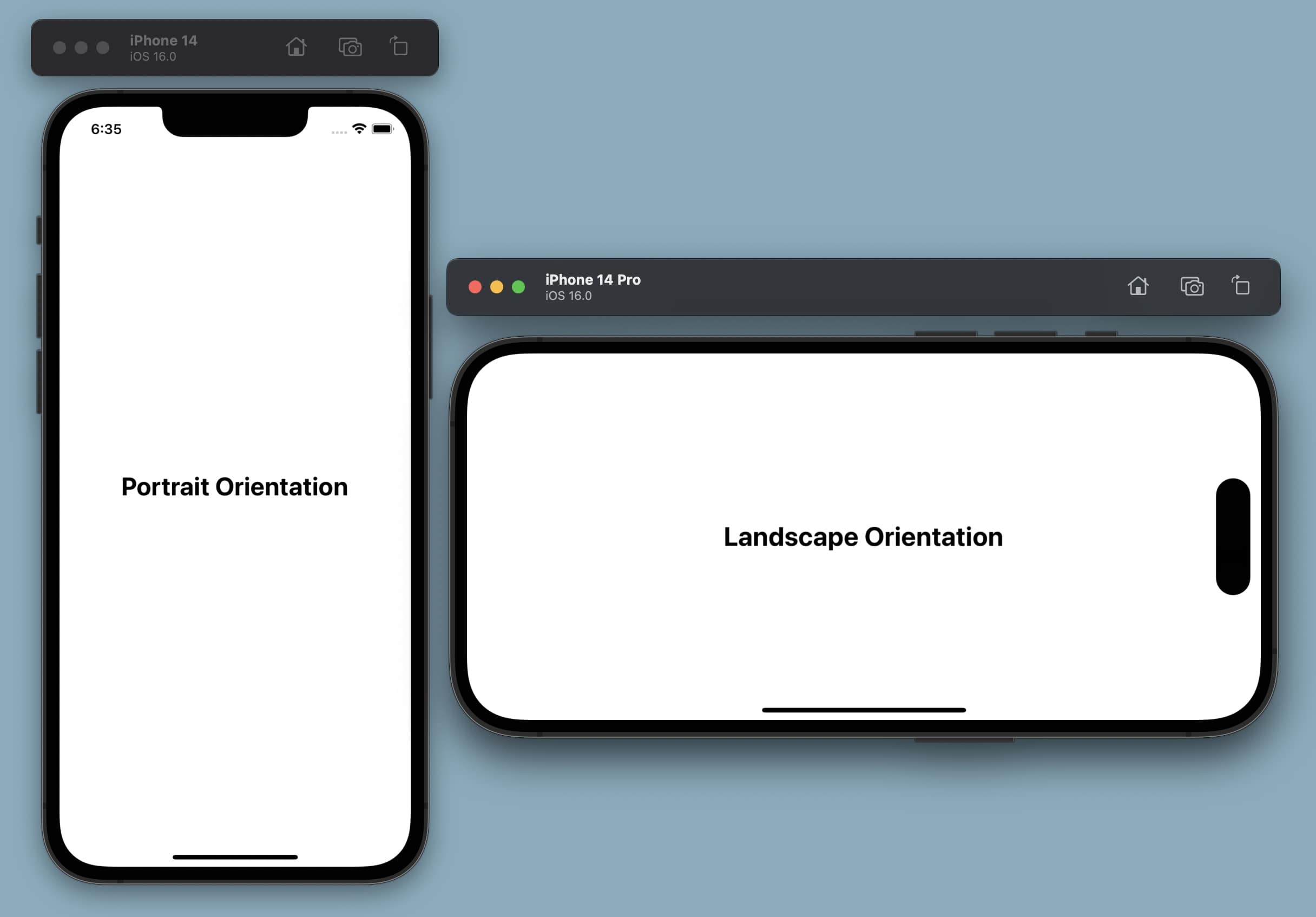
On both Android and iOS platforms, changes to the screen orientation will override any system settings or user preferences. On Android, it is possible to change the screen orientation while taking the user's preferred orientation into account. On iOS, user and system settings are not accessible by the application and any changes to the screen orientation will override existing settings.
Web has limited support .
Terminal
Copy
- npx expo install expo-screen-orientation
If you are installing this in an existing React Native app
, make sure to install expo
in your project.
Warning
Apple added support for split view mode to iPads in iOS 9. This changed how the screen orientation is handled by the system. To put the matter shortly, for iOS, your iPad is always in landscape mode unless you open two applications side by side. To be able to lock screen orientation using this module you will need to disable support for this feature. For more information about the split view mode, check out the official Apple documentation .
You can configure expo-screen-orientation using its built-in config plugin
if you use config plugins in your project (Continuous Native Generation (CNG)
). The plugin allows you to configure various properties that cannot be set at runtime and require building a new app binary to take effect. If your app does not use CNG, then you'll need to manually configure the library.
Example app.json with config plugin
app.json
Copy
{ "expo": { "ios": { "requireFullScreen": true }, "plugins": [ [ "expo-screen-orientation", { "initialOrientation": "DEFAULT" } ] ] } }
Configurable properties
| Name | Default | Description |
| --- | --- | --- |
| initialOrientation | undefined | Only for: <br><br>iOS<br><br> <br><br>Sets the iOS initial screen orientation. Possible values: DEFAULT, ALL, PORTRAIT, PORTRAIT_UP, PORTRAIT_DOWN, LANDSCAPE, LANDSCAPE_LEFT, LANDSCAPE_RIGHT |
Are you using this library in an existing React Native app?
- Open the ios directory in Xcode with
xed ios. If you don't have the directory, runnpx expo prebuild -p iosto generate one. - Tick the
Requires Full Screencheckbox in Xcode. It should be located under Project Target > General > Deployment Info.
import * as ScreenOrientation from 'expo-screen-orientation';
ScreenOrientation.getOrientationAsync()
Gets the current screen orientation.
Returns:
[Promise](https://developer.mozilla.org/en-US/docs/Web/JavaScript/Reference/Global_Objects/Promise) <[Orientation](https://docs.expo.dev/versions/v54.0.0/sdk/screen-orientation#orientation) >
Returns a promise that fulfils with an Orientation
value that reflects the current screen orientation.
ScreenOrientation.getOrientationLockAsync()
Gets the current screen orientation lock type.
Returns:
[Promise](https://developer.mozilla.org/en-US/docs/Web/JavaScript/Reference/Global_Objects/Promise) <[OrientationLock](https://docs.expo.dev/versions/v54.0.0/sdk/screen-orientation#orientationlock) >
Returns a promise which fulfils with an OrientationLock
value.
ScreenOrientation.getPlatformOrientationLockAsync()
Gets the platform specific screen orientation lock type.
Returns:
[Promise](https://developer.mozilla.org/en-US/docs/Web/JavaScript/Reference/Global_Objects/Promise) <[PlatformOrientationInfo](https://docs.expo.dev/versions/v54.0.0/sdk/screen-orientation#platformorientationinfo) >
Returns a promise which fulfils with a PlatformOrientationInfo
value.
ScreenOrientation.lockAsync(orientationLock)
| Parameter | Type | Description |
| --- | --- | --- |
| orientationLock | [OrientationLock](https://docs.expo.dev/versions/v54.0.0/sdk/screen-orientation#orientationlock) | The orientation lock to apply. See the OrientationLock<br> enum for possible values. |
Lock the screen orientation to a particular OrientationLock.
Returns:
[Promise](https://developer.mozilla.org/en-US/docs/Web/JavaScript/Reference/Global_Objects/Promise) <void>
Returns a promise with void value, which fulfils when the orientation is set.
Example
async function changeScreenOrientation() { await ScreenOrientation.lockAsync(ScreenOrientation.OrientationLock.LANDSCAPE_LEFT); }
ScreenOrientation.lockPlatformAsync(options)
| Parameter | Type | Description |
| --- | --- | --- |
| options | [PlatformOrientationInfo](https://docs.expo.dev/versions/v54.0.0/sdk/screen-orientation#platformorientationinfo) | The platform specific lock to apply. See the PlatformOrientationInfo<br> object type for the different platform formats. |
Returns:
[Promise](https://developer.mozilla.org/en-US/docs/Web/JavaScript/Reference/Global_Objects/Promise) <void>
Returns a promise with void value, resolving when the orientation is set and rejecting if an invalid option or value is passed.
ScreenOrientation.supportsOrientationLockAsync(orientationLock)
| Parameter | Type |
| --- | --- |
| orientationLock | [OrientationLock](https://docs.expo.dev/versions/v54.0.0/sdk/screen-orientation#orientationlock) |
Returns whether the OrientationLock
policy is supported on the device.
Returns:
[Promise](https://developer.mozilla.org/en-US/docs/Web/JavaScript/Reference/Global_Objects/Promise) <boolean>
Returns a promise that resolves to a boolean value that reflects whether or not the orientationLock is supported.
ScreenOrientation.unlockAsync()
Sets the screen orientation back to the OrientationLock.DEFAULT policy.
Returns:
[Promise](https://developer.mozilla.org/en-US/docs/Web/JavaScript/Reference/Global_Objects/Promise) <void>
Returns a promise with void value, which fulfils when the orientation is set.
ScreenOrientation.addOrientationChangeListener(listener)
| Parameter | Type | Description |
| --- | --- | --- |
| listener | [OrientationChangeListener](https://docs.expo.dev/versions/latest/sdk/screen-orientation#orientationchangelistenerevent) | Each orientation update will pass an object with the new OrientationChangeEvent<br> to the listener. |
Invokes the listener function when the screen orientation changes from portrait to landscape or from landscape to portrait. For example, it won't be invoked when screen orientation change from portrait up to portrait down, but it will be called when there was a change from portrait up to landscape left.
Returns:
EventSubscription
ScreenOrientation.removeOrientationChangeListener(subscription)
| Parameter | Type | Description |
| --- | --- | --- |
| subscription | EventSubscription | A subscription object that manages the updates passed to a listener function on an orientation change. |
Unsubscribes the listener associated with the Subscription object from all orientation change updates.
Returns:
void
ScreenOrientation.removeOrientationChangeListeners()
Removes all listeners subscribed to orientation change updates.
Returns:
void
Subscription
A subscription object that allows to conveniently remove an event listener from the emitter.
remove()
Removes an event listener for which the subscription has been created. After calling this function, the listener will no longer receive any events from the emitter.
Returns:
void
OrientationChangeEvent
| Property | Type | Description |
| --- | --- | --- |
| orientationInfo | [ScreenOrientationInfo](https://docs.expo.dev/versions/v54.0.0/sdk/screen-orientation#screenorientationinfo) | The current ScreenOrientationInfo of the device. |
| orientationLock | [OrientationLock](https://docs.expo.dev/versions/v54.0.0/sdk/screen-orientation#orientationlock) | The current OrientationLock of the device. |
OrientationChangeListener(event)
| Parameter | Type |
| --- | --- |
| event | [OrientationChangeEvent](https://docs.expo.dev/versions/v54.0.0/sdk/screen-orientation#orientationchangeevent) |
Returns:
void
PlatformOrientationInfo
| Property | Type | Description |
| --- | --- | --- |
| screenOrientationArrayIOS(optional) | [Orientation[]](https://docs.expo.dev/versions/v54.0.0/sdk/screen-orientation#orientation) | Only for: <br><br>iOS<br><br> <br><br>An array of orientations to allow on the iOS platform. |
| screenOrientationConstantAndroid(optional) | number | Only for: <br><br>Android<br><br> <br><br>A constant to set using the Android native API<br>. For example, in order to set the lock policy to unspecified<br>, -1 should be passed in. |
| screenOrientationLockWeb(optional) | [WebOrientationLock](https://docs.expo.dev/versions/v54.0.0/sdk/screen-orientation#weborientationlock) | Only for: <br><br>Web<br><br> <br><br>A web orientation lock to apply in the browser. |
ScreenOrientationInfo
| Property | Type | Description |
| --- | --- | --- |
| horizontalSizeClass(optional) | [SizeClassIOS](https://docs.expo.dev/versions/v54.0.0/sdk/screen-orientation#sizeclassios) | Only for: <br><br>iOS<br><br> <br><br>The horizontal size class<br> of the device. |
| orientation | [Orientation](https://docs.expo.dev/versions/v54.0.0/sdk/screen-orientation#orientation) | The current orientation of the device. |
| verticalSizeClass(optional) | [SizeClassIOS](https://docs.expo.dev/versions/v54.0.0/sdk/screen-orientation#sizeclassios) | Only for: <br><br>iOS<br><br> <br><br>The vertical size class<br> of the device. |
Orientation
UNKNOWN
Orientation.UNKNOWN = 0
An unknown screen orientation. For example, the device is flat, perhaps on a table.
PORTRAIT_UP
Orientation.PORTRAIT_UP = 1
Right-side up portrait interface orientation.
PORTRAIT_DOWN
Orientation.PORTRAIT_DOWN = 2
Upside down portrait interface orientation.
LANDSCAPE_LEFT
Orientation.LANDSCAPE_LEFT = 3
Left landscape interface orientation.
LANDSCAPE_RIGHT
Orientation.LANDSCAPE_RIGHT = 4
Right landscape interface orientation.
OrientationLock
An enum whose values can be passed to the lockAsync
method.
Note:
OrientationLock.ALLandOrientationLock.PORTRAITare invalid on devices which don't supportOrientationLock.PORTRAIT_DOWN.
DEFAULT
OrientationLock.DEFAULT = 0
The default orientation. On iOS, this will allow all orientations except Orientation.PORTRAIT_DOWN. On Android, this lets the system decide the best orientation.
ALL
OrientationLock.ALL = 1
All four possible orientations
PORTRAIT
OrientationLock.PORTRAIT = 2
Any portrait orientation.
PORTRAIT_UP
OrientationLock.PORTRAIT_UP = 3
Right-side up portrait only.
PORTRAIT_DOWN
OrientationLock.PORTRAIT_DOWN = 4
Upside down portrait only.
LANDSCAPE
OrientationLock.LANDSCAPE = 5
Any landscape orientation.
LANDSCAPE_LEFT
OrientationLock.LANDSCAPE_LEFT = 6
Left landscape only.
LANDSCAPE_RIGHT
OrientationLock.LANDSCAPE_RIGHT = 7
Right landscape only.
OTHER
OrientationLock.OTHER = 8
A platform specific orientation. This is not a valid policy that can be applied in lockAsync
.
UNKNOWN
OrientationLock.UNKNOWN = 9
An unknown screen orientation lock. This is not a valid policy that can be applied in lockAsync
.
SizeClassIOS
Each iOS device has a default set of size classes that you can use as a guide when designing your interface.
UNKNOWN
SizeClassIOS.UNKNOWN = 0
COMPACT
SizeClassIOS.COMPACT = 1
REGULAR
SizeClassIOS.REGULAR = 2
WebOrientation
LANDSCAPE_PRIMARY
WebOrientation.LANDSCAPE_PRIMARY = "landscape-primary"
LANDSCAPE_SECONDARY
WebOrientation.LANDSCAPE_SECONDARY = "landscape-secondary"
PORTRAIT_PRIMARY
WebOrientation.PORTRAIT_PRIMARY = "portrait-primary"
PORTRAIT_SECONDARY
WebOrientation.PORTRAIT_SECONDARY = "portrait-secondary"
WebOrientationLock
An enum representing the lock policies that can be applied on the web platform, modelled after the W3C specification
. These values can be applied through the lockPlatformAsync
method.
ANY
WebOrientationLock.ANY = "any"
LANDSCAPE
WebOrientationLock.LANDSCAPE = "landscape"
LANDSCAPE_PRIMARY
WebOrientationLock.LANDSCAPE_PRIMARY = "landscape-primary"
LANDSCAPE_SECONDARY
WebOrientationLock.LANDSCAPE_SECONDARY = "landscape-secondary"
NATURAL
WebOrientationLock.NATURAL = "natural"
PORTRAIT
WebOrientationLock.PORTRAIT = "portrait"
PORTRAIT_PRIMARY
WebOrientationLock.PORTRAIT_PRIMARY = "portrait-primary"
PORTRAIT_SECONDARY
WebOrientationLock.PORTRAIT_SECONDARY = "portrait-secondary"
UNKNOWN
WebOrientationLock.UNKNOWN = "unknown"